
Dandelin-Ellipse Demonstration
Loading the math board and drawing, please wait…
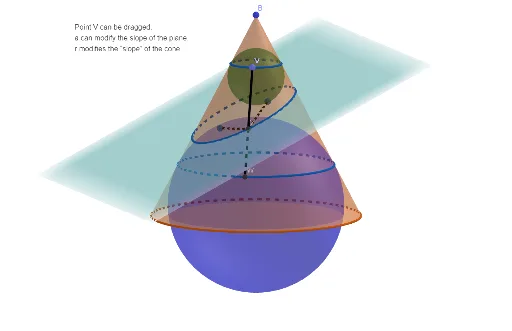
This example demonstrates the construction of a Dandelin Ellipse and its relationship with conic sections. Key math concepts include conic sections, ellipses, geometric construction, intersections of planes and lines. Construction highlights involve GeoGebra commands like Cone, Line, Intersect, Segment, Point, Plane, etc. Suitable for high school students and math enthusiasts studying properties of conic sections and geometric constructions.
GeoGebra Commands & Parameters
Cone(A, B, r) → b, c, dLine(D, yAxis) → fIntersect(xAxis, c, 1) → ESegment(B, E) → gPoint(g) → FPlane(F, f) → pIntersect(xAxis, c, 2) → ILine(B, I) → nLine(F, D) → iIntersect(i, n) → CAngularBisector(B, C, F) → hIntersect(h, zAxis) → GOrthogonalLine(G, n, space) → jIntersect(j, n) → HSphere(G, H) → eAngularBisector(E, F, C) → kIntersect(k, zAxis) → JOrthogonalLine(J, i, space) → lIntersect(l, i) → KSphere(J, K) → mIntersectPath(p, b) → qCorner(q) → L, M, T, UIntersectPath(p, m) → sIntersectPath(p, e) → tOrthogonalLine(J, n, space) → f_1Intersect(f_1, d) → N, OIntersect(n, l) → PIntersect(l, f_1) → QPoint(yAxis) → RPlane(I, A, R) → p_1Plane(N, p_1) → q_1IntersectPath(q_1, m) → c_1OrthogonalLine(G, g, space) → g_1Intersect(g_1, g) → SPlane(S, p_1) → r_1IntersectPath(r_1, e) → d_1Point(d_1) → VLine(B, V) → h_1Intersect(h_1, c_1) → W,Segment(V, W) → i_1Intersect(i_1, q) → Z,Point(s) → F_1Segment(F_1, Z) → j_1Point(t) → F_2Segment(F_2, Z) → k_1
AI Drawing Prompt Reference
Draw a Dandelin ellipse by constructing the intersection of planes and cones. Start by creating a cone, then use the intersection of a plane and the cone to define the two foci F and F1. Next, construct auxiliary lines and planes using the foci and points on the ellipse to determine the specific shape of the ellipse.
The prompt above was compiled from the original drawing commands and is for reference only.