
Optimization of a Box Without Top
Loading the math board and drawing, please wait…
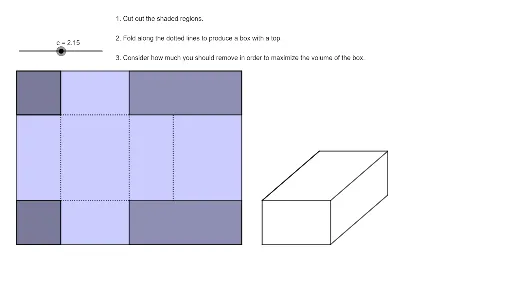
This is a visualization tool for a classic optimization problem, demonstrating how to maximize the volume of a box by adjusting its dimensions. Key mathematical concepts include geometric construction, function graphing, and optimization. Using GeoGebra commands such as Polygon, Segment, and Point, users can intuitively understand the construction process of the optimization problem. Suitable for high school mathematics education and learning.
GeoGebra Commands & Parameters
Polygon(A, B, D, C) → q1, a, b, d, c_1Polygon(A, E, 4) → poly1, f, g, h, i, F, GPolygon(H, C, 4) → poly2, j, k, l, m, I, JPolygon(K, L, N, M) → q2, k_1, l_1, n, m_1Polygon(L, B, O, N) → q3, l_2, b_1, o, n_1Polygon(Q, P, 4) → poly3, p, q, r, s, R, SPolygon(R, T, D, S) → q4, r_1, t, d_1, s_1Segment(J, F) → eSegment(F, M) → f_1Segment(M, P) → g_1Segment(P, J) → h_1Segment(R, N) → i_1Polygon(Q, P, T, D) → q5, q_1, p_1, t_1, d_2Polygon(M, K, B, O) → q6, m_2, k_2, b_2, o_1Point(Circle[W, 8 - (2 * c)]) → A_1Segment(W, A_1) → j_1Rotate(A_1, 35°, W) → B_1Segment(W, U) → a_1Segment(U, V) → e_1Segment(V, Z) → f_2Segment(Z, W) → g_2Segment(W, B_1) → h_2Line(Z, h_2) → i_2Line(B_1, g_2) → j_2Line(V, h_2) → n_2Intersect(i_2, j_2) → C_1Line(C_1, f_2) → p_2Intersect(n_2, p_2) → D_1Segment(W, B_1) → q_2Segment(B_1, C_1) → r_2Segment(C_1, Z) → s_2Segment(V, D_1) → t_2Segment(D_1, C_1) → a_2