
Daisy Construction: Building Patterns with Circles and Intersections
Loading the math board and drawing, please wait…
In collections
Introductory Exercises
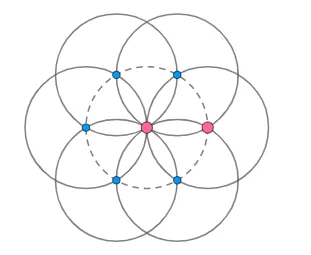
This GeoGebra example demonstrates how a “daisy/floral” looking pattern can be built by constructing multiple circles and taking their pairwise intersections. It focuses on the geometry of circles (determined by center and radius) and on intersection computation between circular objects (Intersect). The construction emphasizes how a chain of intersection points can be orchestrated to form a coherent visual structure rather than a single isolated figure. The key build steps use GeoGebra commands Circle to create the circles and Intersect to compute intersection points, producing the required points and auxiliary objects such as A, B, C, D, E, F, G, k and intermediate circle-related items like c, d, e, f, g, h, G. Suitable for middle school to early university learners, and for classroom demonstrations on geometric construction and pattern-based modeling.
GeoGebra Commands & Parameters
Circle(A, B) → cCircle(B, A) → dIntersect(c, d, 2) → CCircle(C, B) → eIntersect(d, e, 1) → DCircle(D, B) → fIntersect(d, f, 1) → ECircle(E, D) → gIntersect(d, g, 2) → FCircle(F, E) → hIntersect(c, d, 1) → GCircle(G, A) → k
AI Drawing Prompt Reference
Draw a floral pattern made by intersecting multiple circles. The centers and radii are determined by points A, B, C, D, E, F, G, and K. Circles c and d intersect to give point C, then circles e and d intersect to give point D, circles f and d intersect to give point E, circles g and d intersect to give point F, and circles h and e intersect to give point G. Circle k and A intersect. These intersection points form a chain, creating a coherent visual structure.
The prompt above was compiled from the original drawing commands and is for reference only.