
GeoGebra Geometric Construction Example: Coordinate and Conic Sections
Loading the math board and drawing, please wait…
In collections
Prep mathematics
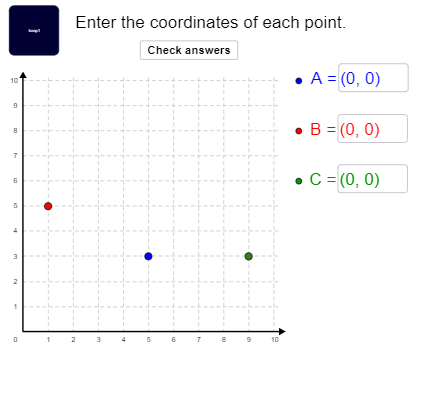
This example demonstrates how to use GeoGebra for geometric construction, showing the drawing of conic sections in a coordinate system. Key mathematical concepts include coordinate geometry, conic section equations, and geometric transformations. Construction involves using commands like Random, Point, Textfield, Shuffle, and Element to generate and arrange points. Suitable for middle school students and above, to understand the relationship between geometric shapes and algebraic equations.
GeoGebra Commands & Parameters
Random(1, 10) → ayRandom(1, 10) → cyRandom(1, 10) → cxRandom(1, 10) → axPoint(a) → GPoint(b) → HRandom(1, 10) → bxRandom(1, 10) → byTextfield(PA) → kgætATextfield(PB) → kgætBTextfield(PC) → kgætCShuffle(CellRange(A1,K11,"point")) → list1, {(5, 3), (1, 5), (9, 3), (0, 4), (2, 8), (7, 7), (7, 8), (5, 5), (1, 4), (0, 10), (5, 0), (7, 3), (10, 8), (0, 3), (2, 7), (9, 10), (9, 2), (9, 1), (7, 2), (1, 3), (1, 9), (10, 5), (3, 3), (8, 7), (2, 10), (4, 9), (8, 6), (6, 1), (8, 9), (5, 7), (10, 10), (1, 7), (0, 1), (1, 2), (7, 9), (0, 0), (8, 8), (6, 4), (6, 8), (0, 2), (6, 3), (4, 1), (9, 6), (1, 1), (6, 7), (2, 4), (10, 4), (10, 7), (3, 8), (8, 3), (0, 7), (8, 0), (2, 3), (4, 7), (10, 2), (6, 0), (5, 6), (5, 10), (0, 8), (9, 7), (4, 2), (10, 6), (10, 3), (8, 1), (3, 6), (1, 0), (3, 1), (6, 2), (1, 10), (7, 1), (9, 4), (2, 2), (7, 5), (10, 9), (5, 8), (10, 0), (2, 5), (2, 1), (7, 4), (10, 1), (9, 5), (6, 6), (4, 8), (5, 9), (4, 4), (0, 9), (3, 5), (4, 6), (2, 0), (9, 9), (4, 3), (7, 0), (1, 8), (8, 4), (6, 10), (3, 4), (9, 8), (9, 0), (3, 2), (2, 6), (0, 6), (5, 1), (7, 10), (4, 5), (8, 10), (5, 2), (6, 9), (4, 10), (4, 0), (3, 9), (5, 4), (7, 6), (8, 2), (3, 7), (6, 5), (3, 0), (3, 10), (1, 6), (2, 9), (8, 5), (0, 5)}Element(list1, 1) → AElement(list1, 2) → BElement(list1, 3) → C
AI Drawing Prompt Reference
Draw a coordinate plane with a grid background. Randomly select three points from a scattered set of integer-coordinate points, and label them as point A, point B, and point C. Display the coordinates of each point in a text box near the point. The construction involves generating many random points, then picking three of them as key points, and finally adding coordinate labels. The overall scene emphasizes the relationship between points and their coordinates in a simple, educational layout.
The prompt above was compiled from the original drawing commands and is for reference only.