
Cylindrical Volume Calculation
Loading the math board and drawing, please wait…
In collections
Multivariable Calculus
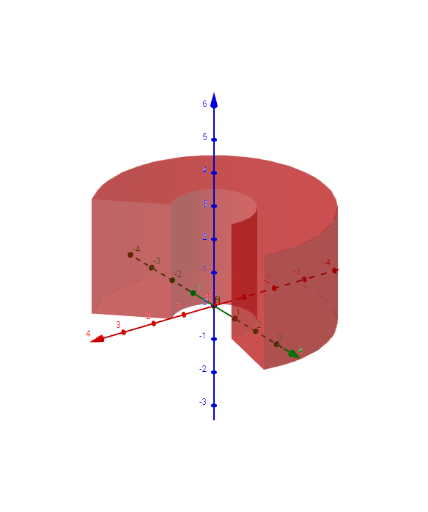
This example demonstrates how to dynamically calculate the volume of a cylinder by adjusting its base radius and height. Core mathematical concepts include the cylinder volume formula, integration, and parametric equations. Construction highlights involve using the Surface command to plot the cylinder, with parameters like r_1, r_2, θ_1, θ_2, z_1, z_2 defining its shape, while a, b, c, d, e, f control parameters, t_1, t_2 enable animations, and text1 provides labels. Suitable for high school and above students studying solid geometry, calculus, volume calculations, and geometric probability.
GeoGebra Commands & Parameters
Surface((r * cos(θ)), (r * sin(θ)), z_1, r, r_1, r_2, θ, θ_1, θ_2) → aSurface((r * cos(θ)), (r * sin(θ)), z_2, r, r_1, r_2, θ, θ_1, θ_2) → bSurface((r_1 * cos(θ)), (r_1 * sin(θ)), z, θ, θ_1, θ_2, z, z_1, z_2) → cSurface((r_2 * cos(θ)), (r_2 * sin(θ)), z, θ, θ_1, θ_2, z, z_1, z_2) → dSurface((r * cos(θ_1)), (r * sin(θ_1)), z, r, r_1, r_2, z, z_1, z_2) → eSurface((r * cos(θ_2)), (r * sin(θ_2)), z, r, r_1, r_2, z, z_1, z_2) → f
AI Drawing Prompt Reference
Draw a cylinder to dynamically calculate its volume by adjusting the base radius and height. Use parametric equations and integration to show the cylinder's surface, generating multiple parts of the cylinder with surface commands using different parameters to highlight the core volume formula. Enable animations for the base radius and height, and label key parameters and formulas.
The prompt above was compiled from the original drawing commands and is for reference only.