
Six Slices of a Peano Surface
Loading the math board and drawing, please wait…
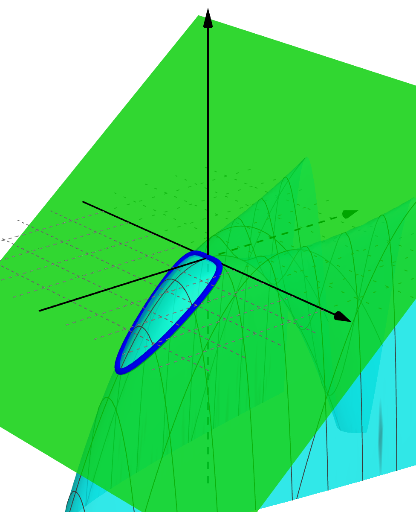
①This example demonstrates six cross-sectional slices of a Peano surface, a space-filling surface, by rotating and intersecting paths, revealing how the surface appears when cut by different planes. ②Core mathematical concepts include Peano curves/surfaces, space-filling properties, intersections of surfaces with planes, and potential connections to probability/statistics with random variables and natural numbers in parameterization. ③Construction highlights: using GeoGebra's Rotate command to rotate the surface or related objects, and IntersectPath to generate intersection curves between the surface and cutting planes; objects include a (likely rotation angle), n (number of slices), p (parameter), and eq1 (surface equation). ④Suitable for high school to university-level mathematics, especially for spatial analytic geometry, topology introduction, or mathematical visualization, helping learners understand cross-sections and spatial structure of complex surfaces.
GeoGebra Commands & Parameters
Rotate(Plane[(0, 0, 0), (1, 0, 0), (0, 1, 0)], n, xAxis) → pIntersectPath(p, a) → eq1
AI Drawing Prompt Reference
Create a visualization of six cross-sectional slices of a Peano space-filling surface. Show a complex space-filling surface intersected by multiple planes at different angles, with each plane producing an intersection curve. Set six cutting planes distributed at regular angular intervals in space, displaying the curves formed where each plane cuts through the surface. These intersection curves clearly reveal the internal complex structure and space-filling properties of the surface, suitable for teaching topology and spatial analytic geometry.
The prompt above was compiled from the original drawing commands and is for reference only.