
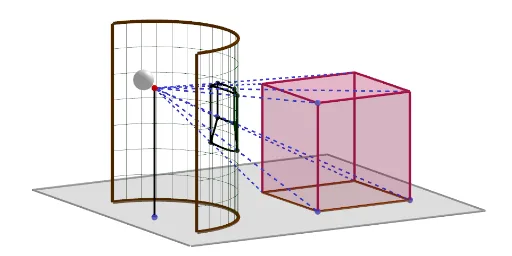
Cylindrical perspective of a prism
Loading the math board and drawing, please wait…
This example demonstrates the cylindrical perspective of a prism, visually representing the 2D projection of a 3D geometric solid. Core math concepts include solid geometry, similar triangles, and the construction of circles and polygons. It utilizes commands like Line, Circle, Cylinder, Segment, Point, Sequence, CircumcircleArc, Element, Polygon, Prism, Midpoint, Ray, Intersect, Centroid, Sphere in GeoGebra. Suitable for high school geometry education to understand spatial projections and transformations.
GeoGebra Commands & Parameters
Line(A, zAxis) → fCircle(A, R, f) → cCylinder(c, h) → a, d, bSegment(B, A) → gPoint(g) → CSequence(Rotate[T, i, f], i, 0, π, π / oo) → l1Sequence(Segment[Element[l1, i], Element[l1, i] + (0, 0, h)], i, 1, Length[l1]) → l2CircumcircleArc(T, B_1, U) → e_2Sequence(Translate[e_2, Vector[(i * Vector[A, A + (0, 0, 1)])]], i, 1, h) → l3Segment(C, A) → m_1Segment(U, U + (0, 0, h)) → n_1Segment(T, T + (0, 0, h)) → a_1Element(l3, Length[l3]) → f_2Polygon(D, E, 4, xOyPlane) → poly1, i, j, k, l, G, HLine(D, m_1) → mPoint(m) → JPrism(poly1, Distance[D, J]) → e, M, arêteDM, arêteEN, arêteGO, arêteHP, arêteMN, arêteNO, arêteOP, arêteMP, N, O, P, faceDENM, faceEGON, faceGHPO, faceDHPM, faceMNOPMidpoint(arêteMN) → QMidpoint(i) → SMidpoint(l) → VMidpoint(j) → WMidpoint(arêteMP) → ZMidpoint(k) → A_1Midpoint(arêteDM) → C_1Midpoint(arêteEN) → D_1Midpoint(arêteGO) → E_1Midpoint(arêteNO) → F_1Midpoint(arêteOP) → G_1Midpoint(arêteHP) → H_1Ray(E, C) → nRay(G, C) → pRay(W, C) → qIntersect(n, b) → I_1, J_1Intersect(q, b) → K_1, L_1Intersect(p, b) → M_1, N_1CircumcircleArc(M_1, K_1, I_1) → rRay(P, C) → sRay(Z, C) → tRay(J, C) → f_1Intersect(s, d) → O_1,Intersect(t, d) → P_1,Intersect(f_1, d) → Q_1,Intersect(f_1, b) → R_1, S_1Intersect(t, b) → T_1, U_1Intersect(s, b) → V_1, W_1Ray(C_1, C) → g_1Ray(H_1, C) → h_1Intersect(g_1, b) → Z_1, A_2Intersect(h_1, c) → B_2,Intersect(h_1, b) → C_2, D_2CircumcircleArc(V_1, T_1, R_1) → c_1Ray(N, C) → i_1Ray(O, C) → j_1Ray(F_1, C) → k_1Intersect(j_1, b) → E_2, F_2Intersect(k_1, c) → G_2,Intersect(k_1, b) → H_2, I_2Intersect(i_1, b) → J_2, K_2Ray(E, C) → l_1Ray(W, C) → p_1Ray(G, C) → q_1Intersect(q_1, b) → L_2, M_2Intersect(p_1, b) → N_2, O_2Intersect(l_1, c) → P_2,Intersect(l_1, b) → Q_2, R_2CircumcircleArc(L_2, N_2, Q_2) → r_1CircumcircleArc(E_2, H_2, J_2) → s_1Ray(D_1, C) → t_1Intersect(t_1, b) → S_2, T_2CircumcircleArc(J_2, S_2, Q_2) → c_2Ray(E_1, C) → b_1Intersect(b_1, b) → U_2, V_2CircumcircleArc(E_2, U_2, L_2) → d_2Point(f_2) → W_2Ray(G_1, C) → i_2Intersect(i_2, b) → B_3, C_3CircumcircleArc(V_1, B_3, E_2) → k_2Ray(Q, C) → j_2Intersect(j_2, b) → D_3, E_3CircumcircleArc(R_1, D_3, J_2) → g_2Ray(H, C) → d_1Intersect(d_1, b) → Z_2, A_3Ray(D, C) → e_1Intersect(e_1, b) → F_3, G_3Ray(V, C) → h_2Intersect(h_2, b) → H_3, I_3CircumcircleArc(Z_2, H_3, F_3) → p_2Ray(A_1, C) → l_2Intersect(arêteHP, b) → J_3,Intersect(l_2, b) → K_3, L_3CircumcircleArc(L_2, K_3, Z_2) → q_2CircumcircleArc(V_1, C_2, Z_2) → r_2Ray(S, C) → m_2Intersect(m_2, b) → M_3, N_3CircumcircleArc(F_3, M_3, Q_2) → s_2Ray(C_1, C) → n_2Intersect(n_2, b) → O_3, P_3CircumcircleArc(F_3, O_3, R_1) → t_2Polygon(I, K, L, F) → q1, i_3, k_3, l_3, f_3Segment(C, G) → a_2Segment(C, E) → b_2Segment(C, N) → g_3Segment(C, O) → h_3Segment(C, P) → j_3Segment(C, J) → m_3Segment(C, H) → n_3Segment(C, D) → p_3Centroid(poly1) → Q_3Ray(Q_3, C) → q_3Point(q_3) → R_3Midpoint(R_3, C) → S_3Sphere(R_3 - (0, 0.13, -0.05), 0.4) → uSphere(Midpoint[T_3, R_3] - (0, 0.1, 0), 0.3) → v
AI Drawing Prompt Reference
Draw the cylindrical perspective projection of a prism, showing its 2D projection. Start by sketching a circle and a cylinder, then draw lines from the center of the circle to the side of the cylinder to form the prism's lateral faces. Next, create a square on the base of the cylinder and extend it to form the top face. Finally, draw rays from the vertices of the top and bottom faces to the side, intersecting with it to create a perspective effect.
The prompt above was compiled from the original drawing commands and is for reference only.