
Cylindrical Coordinates
Loading the math board and drawing, please wait…
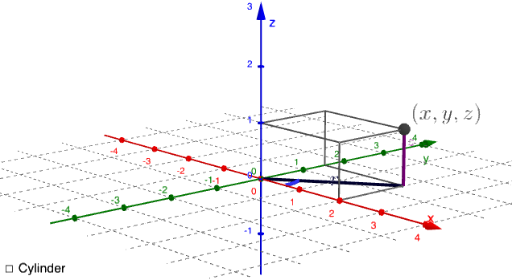
This example demonstrates the representation of points in cylindrical coordinates and geometric transformations. It involves core mathematical concepts such as cylindrical coordinates, polar to Cartesian coordinate conversion, and trigonometric function applications. The construction leverages GeoGebra commands and objects like If, Segment, Pz, θ, r, A, button1, a, text1, text2, min, max, switch, b, c, f, g, Sxd, Syd, Sxu, Syu, Sxu1, Syu1, Sxu2, Syu2, eq1, ShowObjBool, and Checkbox. It is suitable for high school students and math enthusiasts studying spatial coordinate transformations and geometric visualization.
GeoGebra Commands & Parameters
If(θ < 0, CurveCartesian[(abs((1 / 20 * t) + r / 4); (-t)), t, 0, (-θ)], CurveCartesian[((1 / 20 * t) + r / 4; t), t, 0, θ]) → aSegment((0, 0), (x(A), y(A))) → fSegment(A, (x(A), y(A))) → gSegment((x(A), 0, 0), (x(A), y(A), 0)) → SxdSegment((0, y(A), 0), (x(A), y(A), 0)) → SydSegment((x(A), 0, z(A)), (x(A), y(A), z(A))) → SxuSegment((0, y(A), z(A)), (x(A), y(A), z(A))) → SyuSegment((0, 0, z(A)), (x(A), 0, z(A))) → Sxu1Segment((0, 0, z(A)), (0, y(A), z(A))) → Syu1Segment((x(A), 0, 0), (x(A), 0, z(A))) → Sxu2Segment((0, y(A), 0), (0, y(A), z(A))) → Syu2
AI Drawing Prompt Reference
Draw a graph in cylindrical coordinates, including a curve and multiple line segments. The curve is defined by the conversion from polar to Cartesian coordinates, and the line segments represent axes or points. The construction order is to draw the curve first, then the line segments.
The prompt above was compiled from the original drawing commands and is for reference only.