
Cylinder
Loading the math board and drawing, please wait…
In collections
The GeoGebra's Toolbox for Teachers and Students
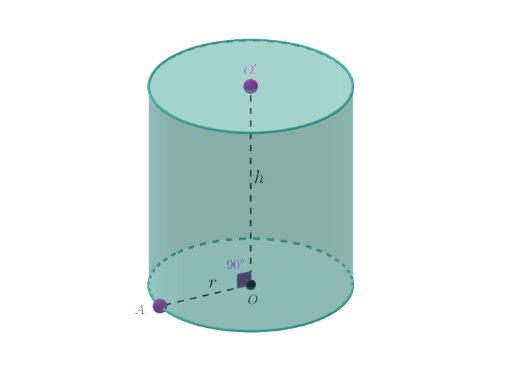
This interactive shape demonstrates a cylinder, part of the Toolbox collection on GeoGebra. A cylinder is a fundamental concept in solid geometry, involving the connection of circular bases and a circular top. The example uses GeoGebra's Toolbox collection, including various commands and objects such as Segment, PointIn, Circle, Point, Angle, and Cylinder. It is suitable for middle school or high school students learning solid geometry and cylinder concepts.
GeoGebra Commands & Parameters
Segment((0, 0, 0), (0, 0, 10)) → hPointIn(z = 0) → ACircle(O, A, xOyPlane) → cPoint(h) → O'Segment(O, O') → fSegment(O, A) → gAngle(O', O, A) → αCylinder(c, f) → a, a_2, a_3
AI Drawing Prompt Reference
Draw a cylinder, showing its circular base and side surface. Start by drawing a vertical line segment for the height, then create a circle at the top of the segment as the base. Connect the center of the base circle to the top point to form a line segment, and mark the angle between them. Finally, generate a complete cylinder using the base circle and the connecting segment to clearly display its 3D structure.
The prompt above was compiled from the original drawing commands and is for reference only.