
Cylinder Volume Calculation by Terry Lee Lindenmuth
Loading the math board and drawing, please wait…
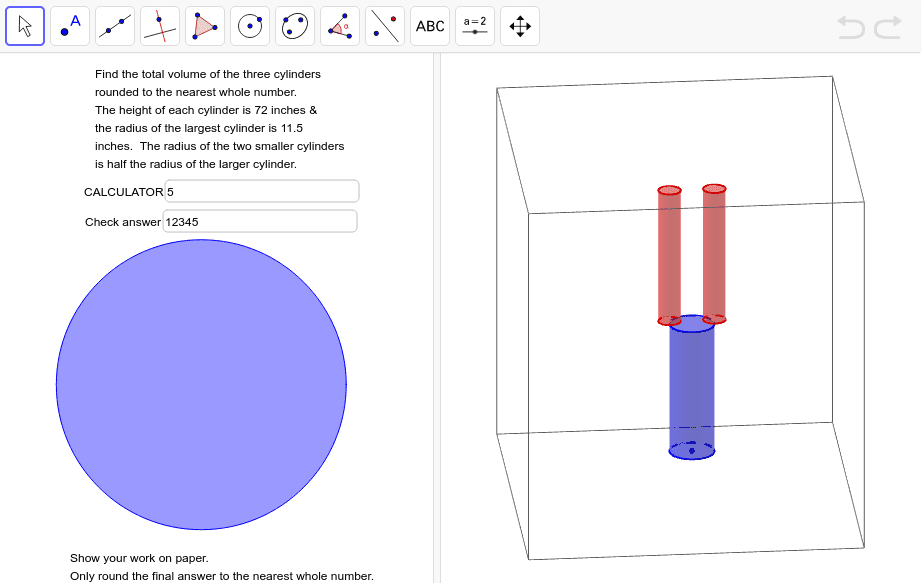
This example demonstrates the calculation of cylinder volume dynamically using GeoGebra, covering core concepts like the cylinder volume formula V=πr²h, circle area, and circumference. It utilizes commands such as Circle, Cylinder, and Textfield. Suitable for middle school students and above for learning and teaching solid geometry volume calculations.
GeoGebra Commands & Parameters
Circle(A, radius, xOyPlane) → cCylinder(c, height - 2) → a, d, bCylinder(C, D, radius / ratiLgSm) → e, f, g, hCylinder(B, E, radius / ratiLgSm) → i, k, p, jTextfield(calc) → CalculatorTextfield(anwer) → Check
AI Drawing Prompt Reference
Draw a cylinder to demonstrate the calculation of its volume. Start by creating a circle, then extend it vertically to form a cylinder with the height equal to the circle's diameter. Next, use half of the first cylinder's base and side to create a smaller cylinder with reduced height. Add text fields beside the shapes to display the volume formula and the answer, helping to understand the concept of the cylinder volume formula V=πr²h and related ideas.
The prompt above was compiled from the original drawing commands and is for reference only.