
Archimedes' Sphere Volume Proof
Loading the math board and drawing, please wait…
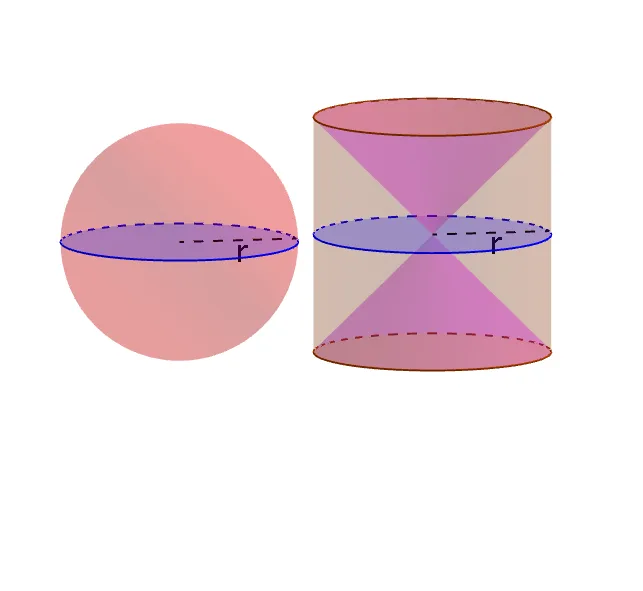
This example demonstrates how to dynamically visualize Archimedes' proof of the sphere volume using GeoGebra, focusing on the relationship between the sphere and its inscribed cylinder to derive the volume formula. Key math concepts include solid geometry, volume calculation, geometric proof, and integral concepts. GeoGebra commands like Circle, Point, Distance, Cylinder, Surface, Polygon are used to construct the sphere and cylinder, while Intersect, Segment, OrthogonalLine precisely depict geometric relationships. Slider animations and Locus features illustrate dynamic changes, making it suitable for high school students learning solid geometry and introductory calculus.
GeoGebra Commands & Parameters
Intersect(xAxis, yAxis) → APoint(xAxis) → BCircle(A, B) → cDistance(A, B) → rPoint(xAxis) → DCircle(D, r) → hSphere(A, r) → aCylinder(h, r) → b, d, eCylinder(h, (-r)) → f, g, iPoint(xAxis) → COrthogonalLine(C, xOyPlane) → jSegment(E, C) → kPoint(k) → GIntersectPath(l, a) → pIntersectPath(l, b) → qSurface((u * cos(θ)) + Distance[A, D], (u * sin(θ)), u, θ, 0, 6.283185307179586, u, (-r), r) → mIntersectPath(l, f) → sOrthogonalLine(D, l) → nSurface(x(H) + (u * cos(θ)), (u * sin(θ)), z(G), u, z(G), r, θ, 0, 6.283185307179586) → oSegment(A, B) → tIntersect(h, xAxis, 2) → JSegment(D, J) → a_1Segment(A, I) → b_1Segment(D, H) → c_1Intersect(u, p) → K, LSegment(I, L) → d_1Segment(A, L) → e_1Segment(H, N) → f_1Segment(C, G) → g_1Segment(A, L) → h_1Polygon(A, I, L) → poly1, l_1, a_2, i_1Segment(S, R) → j_1Polygon(S, R, D) → poly2, d_2, s_1, r_1Segment(D, S) → k_1If(Step ≠ 10, Step ≟ Step + 1, Step ≟ 0) → vIf(Step ≠ 10, Step ≟ Step + 1, Step ≟ 0) → wIf(Step ≠ 10, Step ≟ Step + 1, Step ≟ 0) → m_1If(Step ≠ 10, Step ≟ Step + 1, Step ≟ 0) → n_1If(Step ≠ 10, Step ≟ Step + 1, Step ≟ 0) → o_1If(Step ≠ 10, Step ≟ Step + 1, Step ≟ 0) → p_1
AI Drawing Prompt Reference
Draw a sphere and a cylinder that is inscribed in the sphere, with the sphere's radius as r and the cylinder's height as 2r. Start by drawing two points A and B on the x-axis and drawing a circle c with A and B as its diameter, giving it a radius r. Then draw a circle h centered at D with radius r, and draw two circles f and i in opposite directions with D as the center and radius r. Next, draw a vertical line j from point C on the x-axis, intersecting circle h at point G. Use points A and G to draw the sphere a, and then draw the cylinder b, d, e and f, g, i. Finally, draw the intersection lines between the sphere and the cylinder, and use these lines to create surfaces m and o.
The prompt above was compiled from the original drawing commands and is for reference only.