
Cylinder Volume Calculation and Exploration Activity
Loading the math board and drawing, please wait…
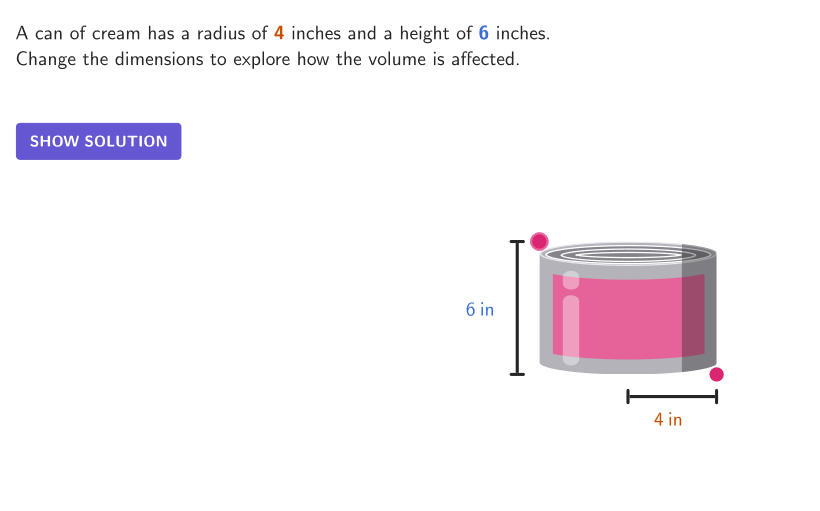
This activity connects word problems, pictures, and the formula for the volume of a cylinder to demonstrate volume calculation. Key math concepts include the cylinder volume formula and the effects of radius and height. Construction involves GeoGebra commands like Shuffle, Element, If, Point, etc. Suitable for middle school math teaching to enhance understanding of solid geometry.
GeoGebra Commands & Parameters
Shuffle({1, 2}) → allQuestTypes, {2, 1}Element(allQuestTypes, Mod[countQuestion, Length[allQuestTypes]] + 1) → caseNumIf(caseNum ≟ 1, 12, 7) → heigMaxIf(caseNum ≟ 1, 3, 1) → heigMinIf(caseNum ≟ 1, 3, 2) → radMinIf(caseNum ≟ 1, 6, 4) → radMaxPoint(Segment[(radMin, 0), (radMax, 0)]) → CB2Mirror(CB2, (0, 0)) → CB1Point(Segment[(x(CB1), heigMin), (x(CB1), heigMax)]) → CT4Shuffle({"glass", "can"}) → allItems1, {"glass", "can"}Shuffle({"cream", "glue", "anchovies", "tuna"}) → allItems2, {"cream", "glue", "anchovies", "tuna"}Element(allItems2, Mod[countQuestion, Length[allItems2]] + 1) → item2If(caseNum ≟ 2, (0, 6), (0, 0)) → OMirror(F1, O) → F2Mirror(H1, yAxis) → H2Mirror(A, O) → BSegment(O', H1) → fSegment(O', O) → gSegment(C, R) → displayRadSegment(HA, HT) → displayHeigcirclePixels(CT4, 7 + (7 * pulsing), Corner[1], Corner[3], Corner[5]) → pulsingObject1circlePixels(CB2, 7 + (7 * pulsing), Corner[1], Corner[3], Corner[5]) → pulsingObject2
AI Drawing Prompt Reference
Draw a cylinder in side view on a coordinate plane. First construct a symmetric bottom structure by drawing a horizontal diameter segment for the base, then mirror it with respect to the origin to show the opposite part. Next, from the left end of the base diameter, draw a vertical segment up to the chosen top height to form the cylinder’s outer outline, referencing both height endpoints. Include visible segments that indicate the radius and the height used for the construction. Finally, add a pulsing dot/pixel pattern along the relevant corners on the top line and the bottom line to emphasize the circular boundary.
The prompt above was compiled from the original drawing commands and is for reference only.