
Cylinder to Torus: Parametric Surface and Rotation Sequence
Loading the math board and drawing, please wait…
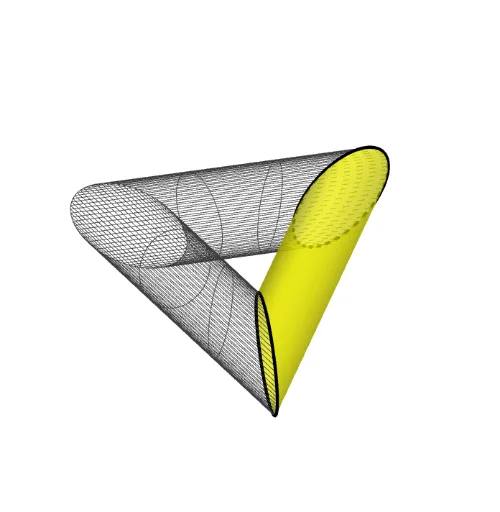
This example demonstrates a continuous 3D transformation from a cylinder to a torus using parametric surfaces and rotational sequences. The core mathematical concepts include parametric surfaces, 3D rotation, sequence generation, and topological deformation in solid geometry. Construction highlights: the Surface command defines the parametric surface, CurveCartesian creates the base curve, Rotate applies rotations, and Sequence generates multiple steps to animate the morphing process. Suitable for high school or university courses on solid geometry, parametric equations, and 3D modeling, this visualization helps students grasp surface parameterization and geometric transformations intuitively.
GeoGebra Commands & Parameters
Surface(((2 + cos(t)) * cos(u)), ((2 + cos(t)) * sin(u)), sin(t), t, 0, (2 * π), u, 0, (2 * π)) → aCurveCartesian(2 + cos(t), 0, sin(t), t, 0, (2 * π)) → bRotate(b, (2 * π / n)) → cSurface((u * x(b(t))) + ((1 - u) * x(c(t))), (u * y(b(t))) + ((1 - u) * y(c(t))), (u * z(b(t))) + ((1 - u) * z(c(t))), t, 0, (2 * π), u, 0, 1) → dSequence(Rotate[d, ((v * 2) * π / n), zAxis], v, 1, n - 1) → l2
AI Drawing Prompt Reference
Visualize a continuous 3D transformation from a cylinder to a torus, demonstrating parametric surfaces and rotational sequences. Start by creating a parametric surface of a cylinder, then generate its base curve and apply continuous rotations. Use parametric surfaces and rotational sequences to animate the morphing process, intuitively showing geometric transformations.
The prompt above was compiled from the original drawing commands and is for reference only.