
Rotation of an Ellipse in Space
Loading the math board and drawing, please wait…
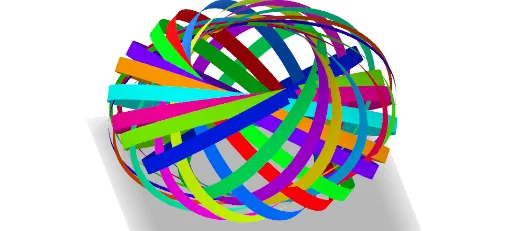
① This example demonstrates how to rotate an ellipse in 3D space and visualize the resulting surface using parametric equations. ② Core mathematical concepts include the parametric representation of an ellipse, 3D rotation transformations, vectors, and surface parameterization, along with sequences to generate multiple rotated copies. ③ Construction details: using GeoGebra commands such as Sequence, Vector, Rotate, CurveCartesian, Surface, and Element, with sliders controlling the rotation angle, constructing the ellipse curve, rotation axis vectors, tangent and normal lines, and generating multiple rotated ellipses and surfaces with color coding. ④ Suitable for high school or university courses in analytic geometry, solid geometry, or computer-assisted mathematics, helping students intuitively understand spatial rotations and parametric surfaces.
GeoGebra Commands & Parameters
Sequence(Vector[(cos((137.5° * t)), sin((137.5° * t)))], t, 0, 26) → l1Vector((sin(Ang), 0, cos(Ang))) → uRotate(u, Change, zAxis) → u'CurveCartesian(((a * cos(t)) * l1(1)) + ((b * sin(t)) * u'), t, 0, (2 * π)) → cVector(A) → vSurface(c(t) + (h * v), t, 0, (2 * π), h, (-e), e) → dSequence(Vector[Rotate[u', (137.5° * t), zAxis]], t, 0, 26) → l2Sequence(Rotate[d, (137.5° * t), zAxis], t, 0, n) → l3Element(l3, A1) → B1Element(l3, A2) → B2Element(l3, A3) → B3Element(l3, A4) → B4Element(l3, A5) → B5Element(l3, A6) → B6Element(l3, A7) → B7Element(l3, A8) → B8Element(l3, A9) → B9Element(l3, A10) → B10Element(l3, A11) → B11Element(l3, A12) → B12Element(l3, A13) → B13Element(l3, A14) → B14Element(l3, A15) → B15Element(l3, A16) → B16Element(l3, A17) → B17Element(l3, A18) → B18Element(l3, A19) → B19Element(l3, A20) → B20Element(l3, A21) → B21Element(l3, A22) → B22Element(l3, A23) → B23Element(l3, A24) → B24Element(l3, A25) → B25Element(l3, A26) → B26Element(l3, A27) → B27Element(l3, A28) → B28Element(l3, A29) → B29Element(l3, A30) → B30Element(l3, A31) → B31Element(l3, A32) → B32Element(l3, A33) → B33Element(l3, A34) → B34Element(l3, A35) → B35Element(l3, A36) → B36Element(l3, A37) → B37Element(l3, A38) → B38Element(l3, A39) → B39Element(l3, A40) → B40
AI Drawing Prompt Reference
Draw an ellipse in 3D space defined by parametric equations, with its shape controlled by two perpendicular vectors, one of which rotates around the vertical axis. Translate this ellipse along a direction vector to create a surface. Then rotate the entire surface around the vertical axis in steps of about 137.5 degrees, repeating this rotation 27 times to generate multiple colored copies, forming a symmetric 3D arrangement of elliptical rings that illustrates the rotation of the ellipse in space.
The prompt above was compiled from the original drawing commands and is for reference only.