
Cylinder Net Demonstration
Loading the math board and drawing, please wait…
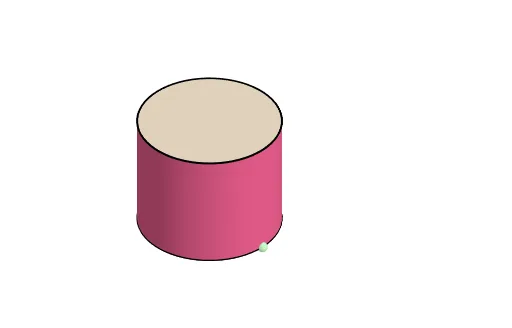
This example demonstrates the net of a cylinder and its geometric properties. It involves core mathematical concepts such as solid geometry, plane figures, area calculation, and spatial visualization. The construction utilizes commands like Cylinder, Line, Intersect, Sphere, Plane, Rotate, Dilate, Vector, Translate, Polygon, Segment, CircleArc, Angle, CurveCartesian, Surface, Midpoint, and Mirror, as outlined in the construction summary. It is suitable for high school students learning solid geometry and for educational demonstrations.
GeoGebra Commands & Parameters
Cylinder(A, C, r) → a, c, d, bLine(D, E) → fIntersect(f, d, 1) → FSphere(F, r) → eIntersect(f, e) → G, HPlane(G, F, C) → gRotate(C, If[0 < i ≤ 1, (i * π / 2), π / 2], D, g) → C'Rotate(d, If[0 < i ≤ 1, (i * π / 2), π / 2], D, g) → d'Rotate(dd, If[0 < i ≤ 1, (i * π / 2), π / 2], D, g) → dd'Dilate(C, If[1 < i ≤ 2, 2 - i, 0], I) → C'_1Dilate(C, If[1 < i ≤ 2, 2 - i, 0], J) → C'_2Vector(C, C'_1) → uVector(C, C'_2) → vTranslate(dd, u) → dd'_1Translate(dd, v) → dd'_2Translate(K, u) → K'Translate(K, v) → K'_1Rotate(K', If[1 < i ≤ 2, ((i - 1) * π), π], C'_1) → K''Rotate(K'_1, If[1 < i ≤ 2, ((-(i - 1)) * π), (-π)], C'_2) → LTranslate(D, u) → D'Translate(D, v) → D'_1Polygon(D', D'_1, N, M) → poly1, d'_1, d'_2, n, mSegment(K'', Q) → jCircleArc(P, Q, M) → kSegment(L, S) → lCircleArc(R, N, S) → pCircleArc(C'_2, D'_1, L) → qCircleArc(C'_1, K'', D') → sPlane(T, A, B) → oRotate(C', If[2 < i ≤ 3, ((i - 2) * π / 2), π / 2], E, g) → C''Rotate(poly1, If[2 < i ≤ 3, ((i - 2) * π / 2), π / 2], E, g) → poly1'Rotate(d', If[2 < i ≤ 3, ((i - 2) * π / 2), π / 2], E, g) → d'_3Rotate(dd', If[2 < i ≤ 3, ((i - 2) * π / 2), π / 2], E, g) → dd'_3Rotate(K'', If[2 < i ≤ 3, ((i - 2) * π / 2), π / 2], E, g) → K'''Rotate(Q, If[2 < i ≤ 3, ((i - 2) * π / 2), π / 2], E, g) → Q'Segment(K''', Q') → j'Rotate(L, If[2 < i ≤ 3, ((i - 2) * π / 2), π / 2], E, g) → L'Rotate(S, If[2 < i ≤ 3, ((i - 2) * π / 2), π / 2], E, g) → S'Segment(L', S') → l'Dilate(C'', If[3 < i ≤ 4, 4 - i, 0], U) → C'''Vector(C'', C''') → wDilate(C'', If[3 < i ≤ 4, 4 - i, 0], V) → C'''_1Vector(C'', C'''_1) → tTranslate(Z, w) → Z'Translate(Z, t) → Z'_1Translate(W, w) → W'Translate(W, t) → W'_1Rotate(W', If[3 < i ≤ 4, ((-(i - 3)) * π), (-π)], C''') → W''CircleArc(C''', Z', W'') → c_1Segment(Z, Z') → f_1Rotate(W'_1, If[3 < i ≤ 4, ((i - 3) * π), π], C'''_1) → A_1CircleArc(C'''_1, Z'_1, A_1) → d_1Segment(Z, Z'_1) → g_1Segment(R, N) → h_1Angle(N, R, S) → αCurveCartesian(x(C'_2) + (r * cos(t)), y(C'_2) + (r * sin(t)), z(C'_2), t, π / 2, π / 2 + α) → a_1Vector(A, C) → ttSurface(x(C'_2) + (r * cos(t)) - (u * x(tt)), y(C'_2) + (r * sin(t)) - (u * y(tt)), z(C'_2) - (u * z(tt)), u, 0, 1, t, π / 2, π / 2 + α) → b_1Surface((-x(C'_2)) - (r * cos(t)) - (u * x(tt)), y(C'_2) + (r * sin(t)) - (u * y(tt)), z(C'_2) - (u * z(tt)), u, 0, 1, t, π / 2, π / 2 + α) → e_1Midpoint(L', S') → B_1Midpoint(K''', Q') → C_1Line(B_1, C_1) → i_1Mirror(d_1, i_1) → k_1Mirror(c_1, i_1) → p_1Mirror(Z, i_1) → Z'_2Mirror(Z', i_1) → Z''Segment(Z'_2, Z'') → j_1Mirror(Z, i_1) → Z'_3Mirror(Z'_1, i_1) → D_1Segment(Z'_3, D_1) → l_1
AI Drawing Prompt Reference
The figure is an unfolded cylinder. It consists of a rectangle and several arcs, where the rectangle represents the lateral surface of the cylinder and the arcs represent the top and bottom. The construction order: first draw the cylinder, then use rotation and plane operations to unfold it, and finally draw the unfolded figure using polygons, line segments, and arcs. The figure includes a central axis, top and bottom arcs, and a rectangle connecting them. It presents as a planar figure that helps understand the geometric structure of the cylinder.
The prompt above was compiled from the original drawing commands and is for reference only.