
Cylinder Inscribed in Cone
Loading the math board and drawing, please wait…
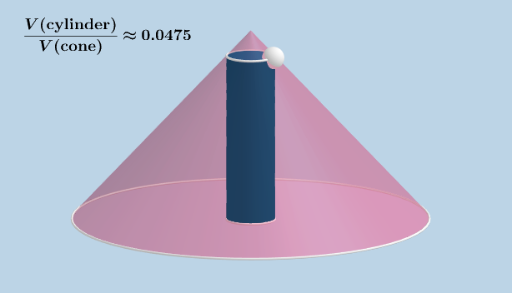
This example demonstrates how to inscribe a right circular cylinder within a right circular cone to maximize its volume. Key mathematical concepts include solid geometry, specifically cylinders and cones, and optimization problems involving limits and derivatives. Using GeoGebra commands such as Cone, Intersect, Segment, Point, Midpoint, Distance, Circle, Cylinder, and Volume, the relationship between the cylinder and cone is visually illustrated. Suitable for high school mathematics education, particularly in solid geometry and optimization problems.
GeoGebra Commands & Parameters
Cone(c, height) → a, d, bIntersect(zAxis, d) → E,Segment(B, D) → fPoint(f) → AMidpoint(H, A) → IDistance(I, A) → eCircle(F, K, G) → gCircle(A, J, H) → hDistance(A, F) → iCylinder(g, i) → j, k, lVolume(j) → n
AI Drawing Prompt Reference
Draw a cone and find a point on its central axis to draw a circle with this point as the center. Then, draw a line segment from the circle's center to the cone's vertex, find the midpoint of this segment, and draw another circle with this midpoint as the center. Finally, use these two circles to draw an inscribed cylinder and calculate its volume.
The prompt above was compiled from the original drawing commands and is for reference only.