
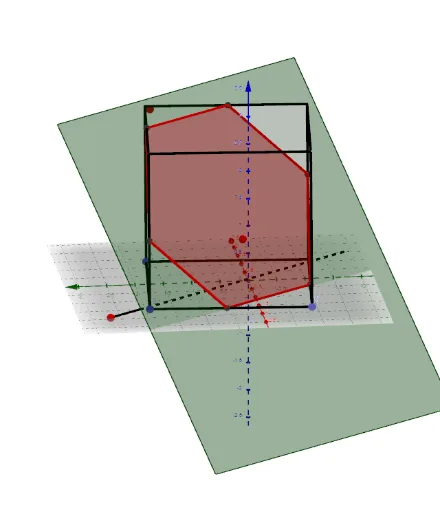
Cutting a Cube with an Interactive Plane
Loading the math board and drawing, please wait…
In collections
Cutting solids by a plane
This example demonstrates how to use an interactive plane to cut a cube, showing the intersection sections of the cube. Key mathematical concepts include the intersection of a plane and a solid in solid geometry. Using GeoGebra commands such as Point, Cube, and Plane, the construction of the cube and its cutting plane is illustrated. Suitable for middle school and above students to learn solid geometry.
GeoGebra Commands & Parameters
Point(Circle[B, Distance[A, B], Segment[A, B]]) → CCube(A, B, C) → a, D, faceCDHG, faceEFGH, arêteAD, arêteAB, arêteBC, arêteCD, arêteAE, arêteDH, arêteEH, arêteEF, E, arêteBF, arêteFG, arêteCG, arêteGH, F, G, H, faceABCD, faceADHE, faceABFE, faceBCGFMidpoint(C, A) → IMidpoint(F, H) → JLine(J, I) → fCircle(I, Distance[A, B], f) → cPoint(c) → KMidpoint(F, C) → MMirror(K, I) → K'Line(K', K) → gCircle(I, (1.2 * Distance[A, B]), g) → dPoint(d) → LPlane(L, K, K') → pCircle(K', L, K) → eCenter(e) → NOrthogonalLine(N, p) → hPoint(h) → OVector(N, O) → uTranslate(p, u) → p'Segment(K', K) → bLine(L, b) → f_1Point(arêteEF) → D_1OrthogonalLine(K, p) → h_1Plane(K', h_1) → p_1OrthogonalLine(K, p_1) → k_1Line(K', k_1) → l_1Intersect(f_1, l_1) → E_1Intersect(k_1, f_1) → F_1Mirror(F_1, K) → G_1Mirror(E_1, K') → H_1Polygon(F_1, E_1, H_1, G_1) → q2, m_1, e_1, n_1, q_1Translate(q2, u) → q2'IntersectPath(p', a) → poly1, P, l, t, m, Q, R, S, A_1, T, i, j, k