
Curves in 2-Space
Loading the math board and drawing, please wait…
In collections
Multivariable Calculus
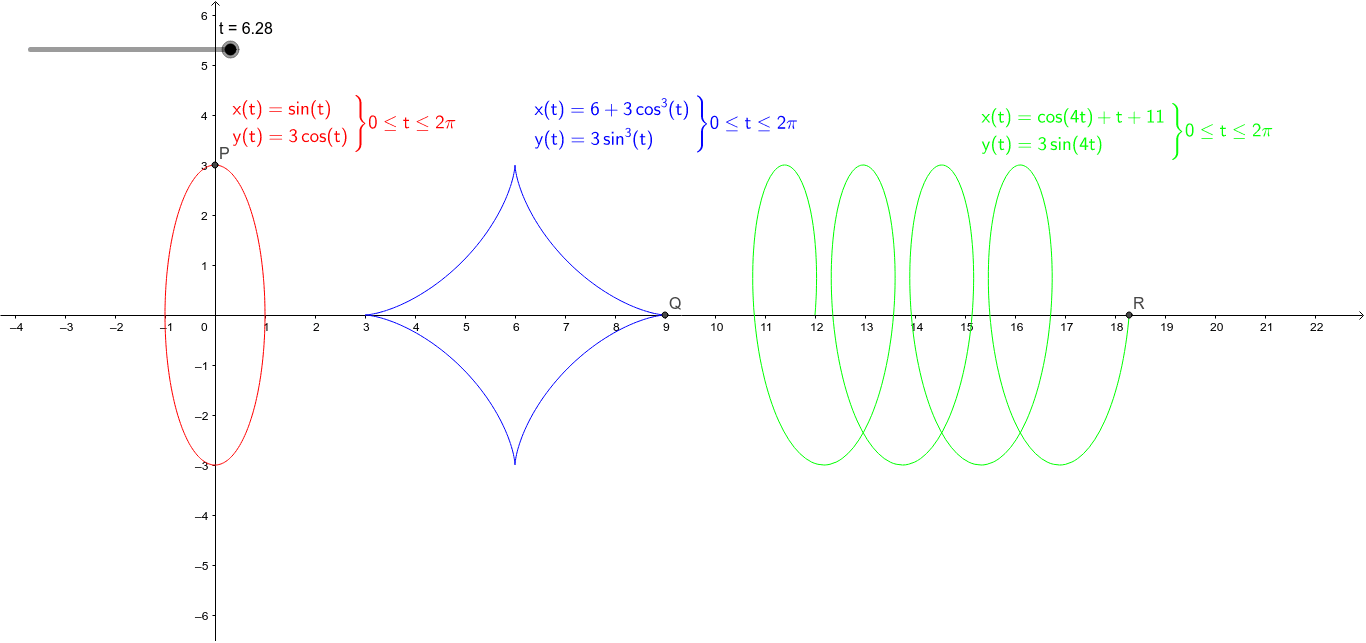
This example demonstrates how to draw and explore various curves in 2-Space. The core math concepts involved include linear equations, sequences and series, limits, and conic sections. The construction uses the GeoGebra command CurveCartesian along with objects like t, P, Q, D, C, text1, text2, text3, E, R for parameterization and labeling. Suitable for high school and above students to understand the geometric properties and algebraic representations of curves.
GeoGebra Commands & Parameters
CurveCartesian(6 + (3 * cos(s)^(3)), (3 * sin(s)^(3)), s, 0, t) → DCurveCartesian(sin(s), (3 * cos(s)), s, 0, t) → CCurveCartesian(cos((4 * s)) + s + 11, (3 * sin((4 * s))), s, 0, t) → E
AI Drawing Prompt Reference
Draw three parametric curves in 2D space defined by the functions 6 + 3cos^3(s), 3sin^3(s); sin(s), 3cos(s); and cos(4s) + s + 11, 3sin(4s) respectively, to illustrate the geometric shapes and relationships of different functions.
The prompt above was compiled from the original drawing commands and is for reference only.