
Curved Surface Area of Cones by Nicola Trubridge
Loading the math board and drawing, please wait…
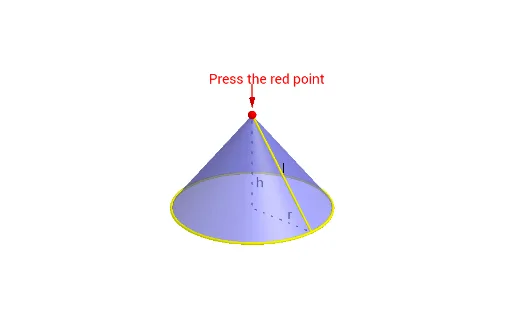
This example demonstrates how the curved surface area of a cone is equal to the area of a sector. By using rotation and mirroring, the cone's curved surface can be unfolded into a sector. The construction involves commands such as Point, Circle, Intersect, Rotate, Mirror, Segment, CircumcircleArc, Surface, and Vector. Suitable for middle school and above students to learn solid geometry.
GeoGebra Commands & Parameters
Point(zAxis) → APoint(Segment[A, (0, 0, 0)]) → PPoint(xAxis) → BCircle(P, Distance[A, B], yAxis) → cIntersect(xOyPlane, c) → C, DIntersect(xAxis, yAxis) → ORotate(D, γ, zAxis) → D_1Rotate(D_1, α, zAxis) → D'Rotate(D_1, (π * x(B) / x(D)), zAxis) → D'_1Mirror(D'_1, O) → ESegment(P, D') → eCircle(zAxis, B) → gCircumcircleArc(D_1, E, D') → hCircumcircleArc(D_1, D'_1, D') → dSegment(P, D_1) → bSurface((u * cos(v)), (u * sin(v)), f(u), u, 0, x(D), v, γ, (2 * π) - γ) → aVector(A + (0, 0, 1), A + (0, 0, 0.2)) → uSegment(O, A) → iSegment(O, B) → j
AI Drawing Prompt Reference
Draw the lateral surface of a cone unfolded into a sector. Start by creating point A on the z-axis and point B on the x-axis. Create a circle c with A and B as centers and AB as the radius on the xOy plane, and find the intersection points C and D of circle c with the x-axis. Then rotate point D around the z-axis to form D_1, and rotate D_1 around the z-axis to form D'. Next, mirror D'_1 at the origin O to form E. Connect point P and D' to form line segment e, create a circle g with B as the center, and connect D_1, E, and D' to form arc h, and connect D_1, D'_1, and D' to form arc d. Finally, use parameters u and v to create a surface a, representing the unfolded lateral surface of the cone.
The prompt above was compiled from the original drawing commands and is for reference only.