
Adding Fractions on a Number Line: Visualizing Fraction Addition
Loading the math board and drawing, please wait…
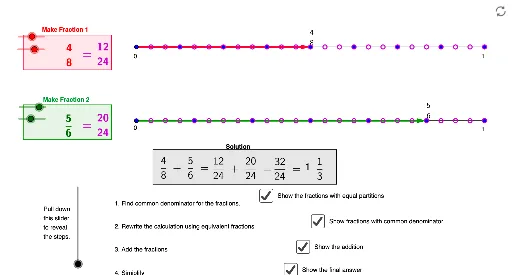
① This GeoGebra example demonstrates how to add fractions with different denominators using a number line, providing a visual and interactive way to understand fraction addition. ② Core math concepts include fraction representation, equivalent fractions, common denominators (LCM), fraction addition, and number line visualization. ③ Construction highlights: using GeoGebra commands such as Point, Segment, Sequence, LCM, Vector, GCD, and Polygon, the applet creates fraction points (frac1dots, frac2dots), a common denominator (commondenom), equivalent fraction points (frac1commondots, frac2commondots), arrows (frac1arrow, frac2arrow), and auxiliary polygons and text labels. Sliders (num1chooser, num2chooser) allow dynamic selection of numerators, showing the process of finding a common denominator and adding fractions in real time. ④ Suitable for upper elementary and middle school students learning fraction operations, as well as for teachers to demonstrate the concept of common denominators and fraction addition on a number line.
GeoGebra Commands & Parameters
Point(a) → APoint(a) → BSegment(B, (x(B) + b, y(B))) → cSegment(A, (x(A) + b, y(A))) → dSequence((x(B) + (b / denom1 * i), y(B)), i, 1, denom1) → frac1dotsSequence((x(A) + (b / denom2 * i), y(A)), i, 1, denom2) → frac2dotsLCM(denom1, denom2) → commondenomSequence((x(B) + (b / commondenom * i), y(B)), i, 1, commondenom) → frac1commondotsSequence((x(A) + (b / commondenom * i), y(A)), i, 1, commondenom) → frac2commondotsVector(B, (x(B) + (num1 * b / denom1), y(B))) → frac1arrowVector(A, (x(A) + (num2 * b / denom2), y(A))) → frac2arrowGCD(unreducednumerator, commondenom) → reducebyPolygon(H, (x(H), y(H) - height), (x(H) + width, y(H) - height), (x(H) + width, y(H))) → poly1, h_1, j, k, lPolygon(I, (x(I), y(I) - height), (x(I) + width, y(I) - height), (x(I) + width, y(I))) → poly2, i_1, m, n, pPolygon(J, (x(J), y(J) - height), (x(J) + bigwidth, y(J) - height), (x(J) + bigwidth, y(J))) → poly3, j_1, q, r, s
AI Drawing Prompt Reference
Draw a horizontal number line with two starting points at its ends. From each point, extend equal-length segments divided into equal parts according to two different denominators, marking tick points. Use arrows from each start to the tick corresponding to the numerator, representing two fractions. Below the line, draw two rectangles representing the sizes of the two fractions, and a wider rectangle for their combined sum after finding a common denominator. Above the line, show the common-denominator subdivisions with dashed guides, and highlight the final sum position. Keep the layout clear to visualize fraction addition.
The prompt above was compiled from the original drawing commands and is for reference only.