
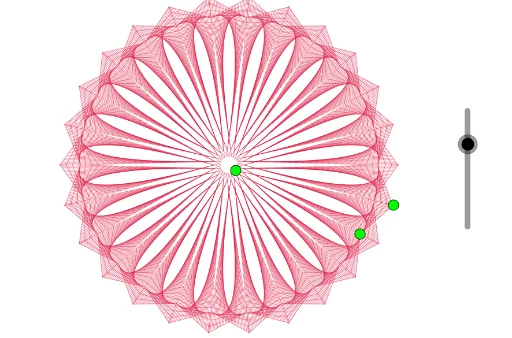
Curve Stitching with Rotations and Reflections
Loading the math board and drawing, please wait…
In collections
Geometry Transformation
Maths for 8th Grade Units 1 to 3
Learn with Lindy: Transformations Intro
This example demonstrates curve stitching using rotations and reflections, illustrating geometric transformations. Key mathematical concepts include rotation, reflection, and sequences. It utilizes commands such as PolyLine, Sequence, and Rotate in GeoGebra. Suitable for middle school and above students to learn about geometric transformations and curve generation.
GeoGebra Commands & Parameters
PolyLine(A, B, C) → fSequence(A + (w * (B - A)), w, 0, 1, 1 / 25) → L_1Sequence(B + (w * (C - B)), w, 0, 1, 1 / 25) → L_2Sequence(Segment[L_1(w), L_2(w)], w, 1, 26) → L_3Rotate(Line[(0, 0), (1, 0)], (2 * π / n)) → gJoin({L_3, Mirror[L_3, g]}) → L_4Sequence(Rotate[L_4, ((w * 2) * π / n)], w, 1, n) → L_5
AI Drawing Prompt Reference
Create a curve pattern generated by rotations and reflections. Start by drawing a polyline with points A, B, and C. Then, create a sequence of line segments from A to B and B to C, with each segment length increasing. Next, rotate and mirror these segments to form a new sequence. Finally, rotate the entire sequence n times to generate the final curve pattern.
The prompt above was compiled from the original drawing commands and is for reference only.