
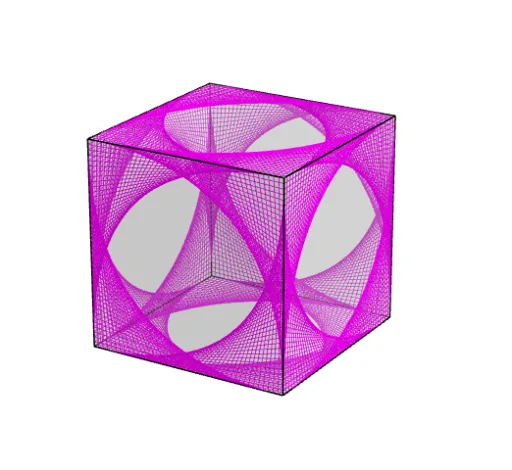
Curve Stitching on a Cube
Loading the math board and drawing, please wait…
This example demonstrates curve stitching on a cube. It involves core concepts of cube, geometric construction, and coordinate geometry. Using GeoGebra commands such as Point, Cube, Sequence, Intersect, Line, Mirror, etc., a series of segments and curves are constructed. Suitable for middle school and above students or teachers for geometry teaching and exploration.
GeoGebra Commands & Parameters
Point(Circle[B, Distance[A, B], Segment[A, B]]) → CCube(A, B, C) → a, D, faceCDHG, faceEFGH, edgeAD, edgeAB, edgeBC, edgeCD, edgeAE, edgeDH, edgeEH, edgeEF, E, edgeBF, edgeFG, edgeCG, edgeGH, F, G, H, faceABCD, faceADHE, faceABFE, faceBCGFSequence(B + (w * (F - B)), w, 0, 1, 1 / 40) → L_1Sequence(F + (w * (G - F)), w, 0, 1, 1 / 40) → L_2Sequence(Segment[Element[L_1, w], Element[L_2, w]], w, 1, 40) → L_3Sequence(Rotate[L_3, (w * π / 2), xAxis], w, 1, 4) → L_4Intersect(zAxis, yAxis) → ILine(I, F) → fSequence(Rotate[L_4, ((w * 2) * π / 3), f], w, 1, 3) → L_5Mirror(L_5, (0, 0, 0)) → L_6