
Curve Stitching: Constructing a Parabola from Straight Lines
Loading the math board and drawing, please wait…
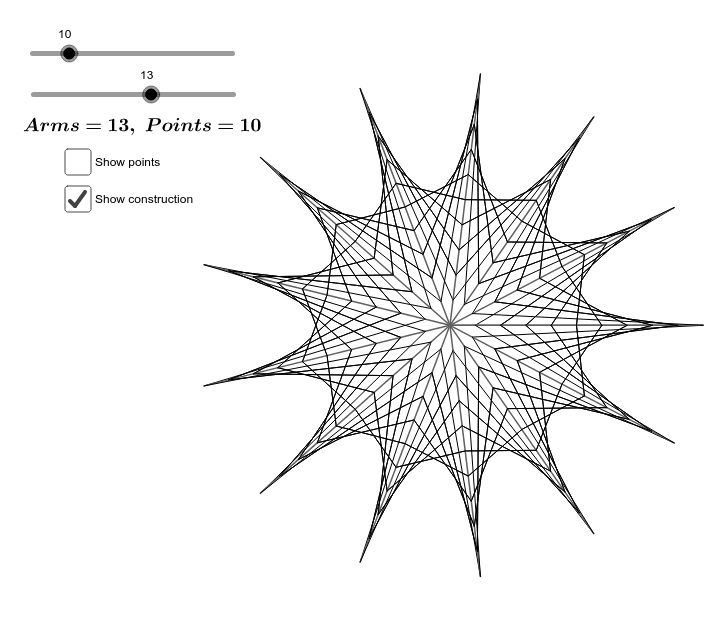
① This example demonstrates how to construct a parabola by stitching together a series of straight line segments, visually revealing the envelope of lines that forms a curved shape. ② Core mathematical concepts include parabolas, straight lines, sequences, rational numbers, and function graphing, with emphasis on parametric construction and locus ideas. ③ Construction highlights: using GeoGebra's Sequence command to generate point sets and line segments, defining parameters n and a, and utilizing lists list1 through list5, along with objects A, b, c, and text1, to create a dynamic line-stitching effect that outlines the parabola. ④ Suitable for middle or high school mathematics classrooms, this activity helps students understand quadratic functions, line envelopes, and the basics of sequences and iteration, and can serve as an exploratory learning resource.
GeoGebra Commands & Parameters
Sequence((cos(((k * 2) * π / a)), sin(((k * 2) * π / a))), k, 0, a + 1) → list1Sequence(Sequence[(k * Element[list1, p] / n), k, 0, n], p, 1, a + 1) → list4Sequence(Sequence[Segment[Element[Element[list4, k], p], Element[Element[list4, k + 1], n - p + 3]], p, 2, n], k, 1, a) → list5Sequence(Segment[(0, 0), Element[list1, k]], k, 1, a + 1) → list2Sequence(Sequence[Segment[Element[Element[list4, k], n - p + 3], Element[Element[list4, k + 1], p]], p, 2, n], k, 1, a) → list3
AI Drawing Prompt Reference
Draw a parabola shape. The shape is constructed by stitching together a series of straight line segments. The line segments are defined by parameters n and a, and generated using point sets and lists. The segments are connected in order to form the outline of the parabola, showing how straight lines combine to create a curve.
The prompt above was compiled from the original drawing commands and is for reference only.