
Curve Projection onto a Surface
Loading the math board and drawing, please wait…
In collections
intersection: surface-surface, curve-curve
intersection: surface-surface, curve-curve
intersection: surface-surface, curve-curve
intersection: surface-surface, curve-curve
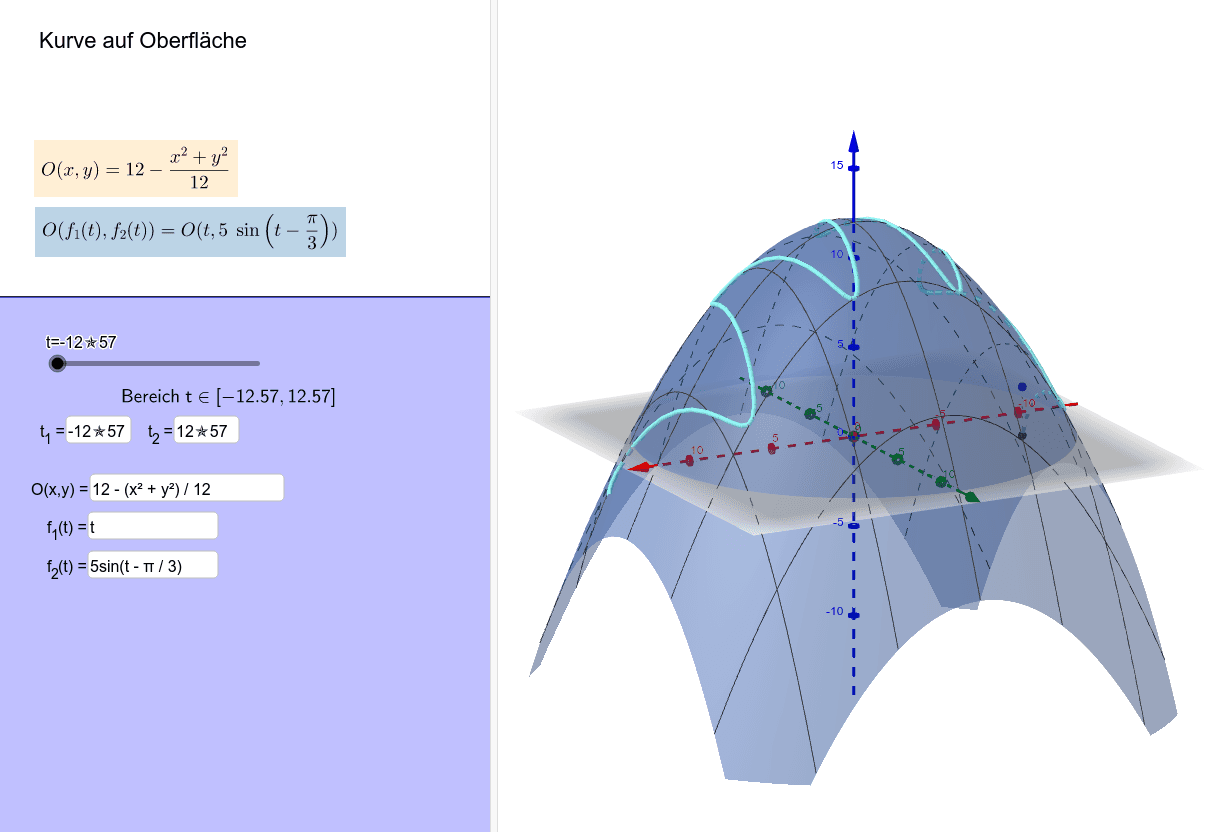
This example demonstrates the projection of a parametric curve onto a given surface in 3D space. Key math concepts include parametric equations, surface geometry, and projection transformations. It utilizes GeoGebra commands and objects such as Sequence, Textfield, t_2, t_1, du, f_2, f_1, u, O, Text1, zL, Textfeld1, Textfeld2, Textfeld3, Text5, a, b, Text4, Textfeld4, Textfeld5, xL, sL, Text2, vL for construction. Suitable for high school and above students to learn about the application of parametric equations and spatial geometry.
GeoGebra Commands & Parameters
Sequence((f_1(k), f_2(k), O(f_1(k), f_2(k))), k, t_1, u, du) → zLTextfield(f_1) → Textfeld1Textfield(f_2) → Textfeld2Textfield(O) → Textfeld3Textfield(t_1) → Textfeld4Textfield(t_2) → Textfeld5Sequence((f_1(k), f_2(k)), k, t_1, u, du) → xLSequence(Segment[(f_1(k), f_2(k), 0), (f_1(k), f_2(k), O(f_1(k), f_2(k)))], k, t_1, u, du) → sLSequence(Segment[(f_1(k), f_2(k), O(f_1(k), f_2(k))), (f_1(k + du), f_2(k + du), O(f_1(k + du), f_2(k + du)))], k, t_1, t_2 - du, du) → vL
AI Drawing Prompt Reference
Draw a parametric curve in 3D space and project it onto a surface to demonstrate the projection process. First, plot the projection of the curve onto the xy-plane. Then, draw vertical line segments from each point on the curve upward to the surface, and finally connect the endpoints of these segments to form the projected curve.
The prompt above was compiled from the original drawing commands and is for reference only.