
Cuboid Net Demonstration by Arthur Lee
Loading the math board and drawing, please wait…
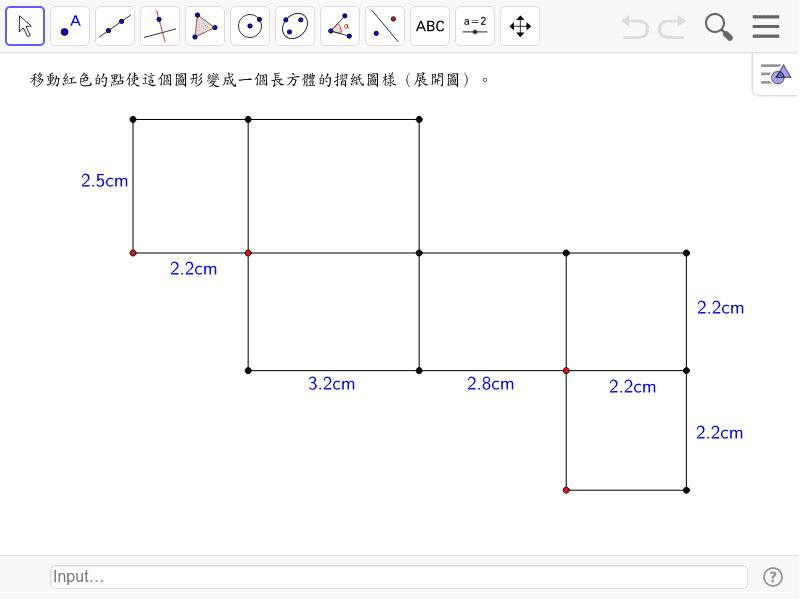
This example demonstrates the net of a cuboid, exploring its geometric properties and relationships. It involves core math concepts like solid geometry, polygons, geometric construction, and logic. The construction uses commands such as Point, OrthogonalLine, Intersect, Segment, and Distance. Suitable for high school students learning spatial geometry and geometric constructions.
GeoGebra Commands & Parameters
Point(yAxis) → QOrthogonalLine(Q, yAxis) → aOrthogonalLine(B, xAxis) → bIntersect(a, b) → DSegment(Q, A) → cSegment(Q, D) → dSegment(A, B) → eSegment(B, D) → fPoint(xAxis) → ROrthogonalLine(R, xAxis) → gIntersect(a, g) → FSegment(D, F) → hSegment(R, F) → iOrthogonalLine(G, xAxis) → jIntersect(a, j) → HSegment(F, H) → kSegment(G, H) → lOrthogonalLine(I, yAxis) → mIntersect(b, m) → JSegment(I, J) → nSegment(D, J) → pPoint(g) → SOrthogonalLine(S, g) → qIntersect(j, q) → LSegment(S, L) → rSegment(L, G) → sSegment(R, S) → tPoint(a) → POrthogonalLine(P, a) → a_1Intersect(m, a_1) → NSegment(I, N) → b_1Segment(N, P) → c_1Segment(P, Q) → d_1Segment(I, Q) → e_1Segment(B, R) → f_1Segment(R, G) → g_1Distance(A, B) → distanceABDistance(B, R) → BRDistance(R, G) → distanceEGDistance(L, G) → LGDistance(N, P) → NPDistance(P, Q) → PQDistance(H, G) → distanceHG
AI Drawing Prompt Reference
Draw the net of a cuboid, consisting of six connected rectangles, arranged in a continuous plane to show the geometric properties and relationships of the cuboid. Start by drawing two perpendicular lines and finding their intersection point. Based on this, construct four rectangles by connecting adjacent vertices, forming the unfolded shape. Label the lengths of the sides to illustrate the dimensions of the cuboid.
The prompt above was compiled from the original drawing commands and is for reference only.