
Cubes Animation
Loading the math board and drawing, please wait…
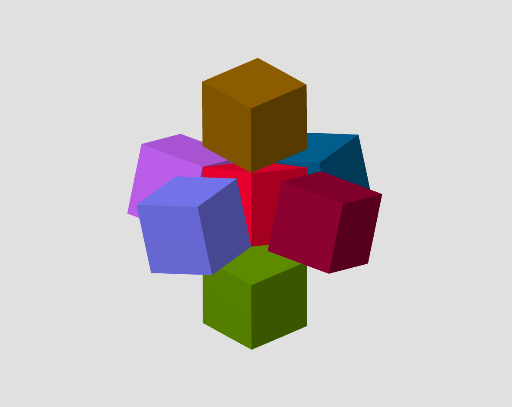
This is an interesting animation of cubes on a plane, demonstrating the transformation of cubes. Key mathematical concepts include solid geometry and transformation. Using GeoGebra commands such as Polygon, Rotate, Plane, and Mirror, a dynamic cube animation can be constructed. Suitable for middle school and above students or teachers for teaching demonstrations.
GeoGebra Commands & Parameters
Polygon(A2_4, A4_4, A3_3, A4_8, A2_2) → poly1, a2_4, a4_4, a3_3, a4_8, a2_2Polygon(A4_6, A2_4, A2_2, A4_2, A3_2) → poly2, a4_6, f, g, a4_2, a3_2Polygon(A1_1, A4_4, A2_4, A4_6, A1_3) → poly3, a1_1, i, j, k, a1_3Polygon(A2_1, A4_7, A1_3, A1_1, A4_1) → poly4, a2_1, a4_7, l, m, a4_1Polygon(A4_1, A1_1, A4_4, A3_3, A3_1) → poly5, n, p, q, r, a3_1Polygon(A4_8, A1_4, A4_5, A3_1, A3_3) → poly6, s, a1_4, a4_5, t, aPolygon(A4_2, A1_2, A1_4, A4_8, A2_2) → poly7, b, a1_2, c, d, ePolygon(A4_5, A2_3, A2_1, A4_1, A3_1) → poly8, f_1, a2_3, g_1, h_1, i_1Polygon(A1_2, A4_3, A2_3, A4_5, A1_4) → poly9, j_1, a4_3, k_1, l_1, m_1Polygon(A3_2, A4_2, A1_2, A4_3, A3_4) → poly10, n_1, p_1, q_1, r_1, a3_4Polygon(A3_4, A4_3, A2_3, A2_1, A4_7) → poly11, s_1, t_1, a_1, b_1, c_1Polygon(A3_4, A4_7, A1_3, A4_6, A3_2) → poly12, d_1, e_1, f_2, g_2, h_2Rotate(Translate[obj, Vector[(0, 0, 0), (0, 0, 0)]], to, Line[A4_4, A4_3]) → Q1Rotate(A4_5, to, Line[A4_1, A4_2]) → C1Rotate(A1_2, to, Line[A4_1, A4_2]) → C2Plane(C1, poly6) → P1Mirror(Q1, P1) → Q2Mirror(P1, (0, 0, 0)) → P2Mirror(Q1, P2) → Q3Rotate(A4_8, to, Line[A4_1, A4_2]) → C3Plane(C3, poly1) → P3Mirror(Q1, P3) → Q4Mirror(P3, (0, 0, 0)) → P4Mirror(Q1, P4) → Q5Rotate(A4_5, to, Line[A4_4, A4_3]) → C4Plane(C4, Plane[y = 0]) → P5Mirror(Q1, P5) → Q6Mirror(P5, (0, 0, 0)) → P6Mirror(Q1, P6) → Q7
AI Drawing Prompt Reference
Draw a 3D composite solid made of twelve quadrilateral faces, each a polygon, interconnected to form a closed polyhedral structure. The vertices are distributed in space symmetrically. Then rotate the entire object around an edge, and use several planes to mirror the rotated copies, creating multiple symmetric versions around the original. The result is a dynamic animation of cubes showing rotational and reflective transformations.
The prompt above was compiled from the original drawing commands and is for reference only.