
Cubes 4: Stochastic Process and Volume Exploration
Loading the math board and drawing, please wait…
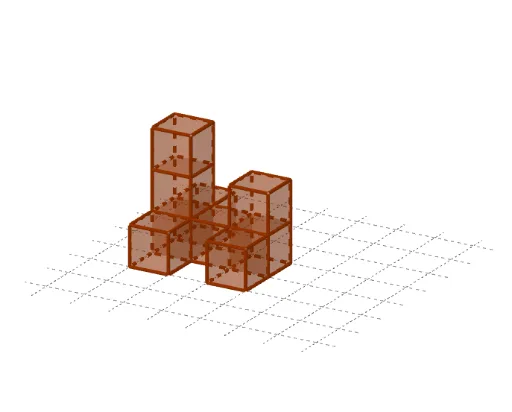
①This GeoGebra example constructs multiple cubes and their combinations to visually demonstrate the geometry of cubes and cuboids, volume relationships, and incorporates the concept of a stochastic process, possibly simulating random stacking or volume variation. ②Core mathematical concepts include geometric properties of cubes and cuboids, volume calculation, functional relationships, and basic ideas of stochastic processes, involving coordinate definitions and spatial relations of points, faces, and edges. ③Construction highlights: From the summary, the Point command defines points A, B, C, etc., the Cube command generates cubes, and multiple faces (e.g., faceABCD, faceADHE) and edges (e.g., edgeAD, edgeAB) are created; auxiliary points I, J, K, L, M, N and faces like faceCDJI form a composite solid; objects a and b may control dimensions or random parameters. ④Suitable for upper secondary or early university students, for teaching solid geometry, volume concepts, and mathematical modeling with stochastic processes, as well as an advanced example of dynamic geometric construction in GeoGebra.
GeoGebra Commands & Parameters
Point(Circle[B, Distance[A, B], Segment[A, B]]) → CCube(A, B, C) → a, D, faceCDHG, faceEFGH, edgeAD, edgeAB, edgeBC, edgeCD_1, edgeAE, edgeDH, edgeEH, edgeEF, E, edgeBF, edgeFG, edgeCG, edgeGH, F, G, H, faceABCD, faceADHE, faceABFE, faceBCGFPoint(Circle[C, Distance[D, C], Segment[D, C]]) → ICube(D, C, I) → b, J, faceIJNM, faceKLMN, edgeDJ, edgeCD, edgeCI, edgeIJ, edgeDK, edgeJN, edgeKN, edgeKL, K, edgeCL, edgeLM, edgeIM, edgeMN, L, M, N, faceCDJI, faceDJNK, faceCDKL, faceCIMLPoint(Circle[P, Distance[O, P], Segment[O, P]]) → QCube(O, P, Q) → c, R, faceQRVU, faceSTUV, edgeOR, edgeOP, edgePQ, edgeQR, edgeOS, edgeRV, edgeSV, edgeST, S, edgePT, edgeTU, edgeQU, edgeUV_1, T, U, V, faceOPQR, faceORVS, faceOPTS, facePQUTPoint(Circle[U, Distance[V, U], Segment[V, U]]) → WCube(V, U, W) → d, Z, face4, face5, edgeVZ, edgeUV, edgeUW, edgeWZ, edge2, edge4, edge6, edge5, A_1, edge1, edge7, edge3, edge8, B_1, C_1, D_1, faceUVZW, face3, face1, face2Point(Circle[B_1, Distance[A_1, B_1], Segment[A_1, B_1]]) → E_1Cube(A_1, B_1, E_1) → e, F_1, face10, face11, edge10, edge9, edge12, edge14, edge11, edge16, edge18, edge17, G_1, edge13, edge19, edge15, edge20, H_1, I_1, J_1, face6, face8, face7, face9Point(Circle[K_1, Distance[Q, K_1], Segment[Q, K_1]]) → L_1Cube(Q, K_1, L_1) → f, M_1, face16, face17, edge22, edge21, edge24, edge26, edge23, edge28, edge30, edge29, N_1, edge25, edge31, edge27, edge32, O_1, P_1, Q_1, face12, face14, face13, face15Point(Circle[R_1, Distance[K_1, R_1], Segment[K_1, R_1]]) → S_1Cube(K_1, R_1, S_1) → g, T_1, face22, face23, edge34, edge33, edge36, edge38, edge35, edge40, edge42, edge41, U_1, edge37, edge43, edge39, edge44, V_1, W_1, Z_1, face18, face20, face19, face21Point(Circle[V_1, Distance[U_1, V_1], Segment[U_1, V_1]]) → A_2Cube(U_1, V_1, A_2) → h, B_2, face28, face29, edge46, edge45, edge48, edge50, edge47, edge52, edge54, edge53, C_2, edge49, edge55, edge51, edge56, D_2, E_2, F_2, face24, face26, face25, face27Point(Circle[H_2, Distance[G_2, H_2], Segment[G_2, H_2]]) → I_2Cube(G_2, H_2, I_2) → i, J_2, face34, face35, edge58, edge57, edge60, edge62, edge59, edge64, edge66, edge65, K_2, edge61, edge67, edge63, edge68, L_2, M_2, N_2, face30, face32, face31, face33