
Cube Nets by Anthony OR 柯志明
Loading the math board and drawing, please wait…
In collections
3D Geometry & Cross Sections
Surface Area & Volume
Surface Area & Volume
Surface Area and Volume
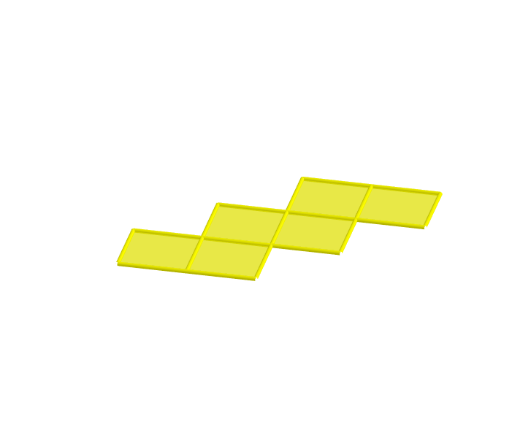
Nets of 3D Figures 立體圖形的摺紙圖樣
This example demonstrates the nets of a cube and their folding into the 3D shape. Core math concepts include solid geometry, polygons, and geometric transformations. Constructed using GeoGebra commands like Cube, Rotate, Midpoint, OrthogonalLine, Segment, and Translate. Suitable for high school geometry education or geometric construction learning.
GeoGebra Commands & Parameters
Cube(A, B, xOyPlane) → a, C, faceBCGF, faceCDHG, faceEFGH, edgeAD, edgeAB, edgeBC, edgeCD, edgeAE, edgeDH, edgeEH, D, edgeEF, edgeBF, edgeFG, edgeCG, edgeGH, E, F, G, H, faceABCD, faceADHE, faceABFERotate(faceABFE, (90° * t), edgeAB) → faceABFE'Midpoint(A, C) → IOrthogonalLine(I, xOyPlane) → bRotate(faceABFE', 90°, b) → faceABFE''Rotate(faceABFE', 180°, b) → faceABFE''_1Rotate(faceABFE', 270°, b) → faceABFE''_2Rotate(E, (90° * t), edgeAB) → E'Rotate(F, (90° * t), edgeAB) → F'Segment(E', F') → cRotate(Rotate[faceEFGH, (90° * t), edgeAB], (90° * t), Segment[E', F']) → poly1Translate(J, Vector[A, B]) → KTranslate(faceABFE''_1, Vector[A, J]) → poly2Translate(faceABCD, Vector[A, J]) → faceABCD'Translate(faceABFE', Vector[A, J]) → faceABFE''_3Translate(poly1, Vector[A, J]) → poly1'Translate(Rotate[Rotate[faceADHE, (90° * t), edgeAB], ((-(90°)) * t), Segment[Rotate[E, (90° * t), edgeAB], Rotate[A, (90° * t), edgeAB]]], Vector[A, J]) → poly4Translate(faceABFE'', Vector[A, J]) → faceABFE'''Translate(faceABCD, Vector[A, L]) → faceABCD'_1Translate(faceABFE''_1, Vector[A, L]) → poly3Translate(faceABFE', Vector[A, L]) → faceABFE''_4Translate(poly1, Vector[A, L]) → poly1'_1Translate(faceABFE'', Vector[A, L]) → faceABFE'''_1Midpoint(B, E') → MOrthogonalLine(M, faceABFE') → dTranslate(Rotate[faceABFE'', 180°, d], Vector[A, L]) → poly5Translate(faceABCD, Vector[A, O]) → faceABCD'_2Translate(faceABFE''_1, Vector[A, O]) → poly6Translate(faceABFE', Vector[A, O]) → faceABFE''_5Translate(poly1, Vector[A, O]) → poly1'_2Translate(faceABFE'', Vector[A, O]) → faceABFE'''_2Translate(Rotate[Rotate[faceADHE, (90° * t), edgeCD], (90° * t), Segment[Rotate[H, (90° * t), edgeCD], Rotate[D, (90° * t), edgeCD]]], Vector[A, O]) → poly8Translate(faceABCD, Vector[A, N]) → faceABCD'_3Translate(faceABFE''_1, Vector[A, N]) → poly7Translate(faceABFE', Vector[A, N]) → faceABFE''_6Translate(poly1, Vector[A, N]) → poly1'_3Translate(Rotate[faceABFE'', 180°, d], Vector[A, N]) → poly9Rotate(Rotate[H, (90° * t), edgeAB], (90° * t), Segment[E', F']) → PMidpoint(P, F') → QOrthogonalLine(Q, poly1) → eTranslate(Rotate[Rotate[faceABFE'', 180°, d], 180°, e], Vector[A, N]) → poly10Translate(faceABCD, Vector[A, R]) → faceABCD'_4Translate(faceABFE''_1, Vector[A, R]) → poly11Translate(faceABFE', Vector[A, R]) → faceABFE''_7Translate(poly1, Vector[A, R]) → poly1'_4Translate(Rotate[faceABFE'', 180°, d], Vector[A, R]) → poly12Rotate(F', 180°, b) → F''Midpoint(C, F'') → SOrthogonalLine(S, faceABFE''_1) → gTranslate(Rotate[Rotate[Rotate[faceADHE, (90° * t), edgeCD], (90° * t), Segment[Rotate[H, (90° * t), edgeCD], Rotate[D, (90° * t), edgeCD]]], 180°, g], Vector[A, R]) → poly15Translate(faceABCD, Vector[A, T]) → faceABCD'_5Translate(faceABFE''_1, Vector[A, T]) → poly13Translate(faceABFE', Vector[A, T]) → faceABFE''_8Translate(Rotate[faceABFE', 270°, b], Vector[A, T]) → poly14Translate(Rotate[poly1, (-(90°)), b], Vector[A, T]) → poly16Translate(Rotate[Rotate[Rotate[faceADHE, (90° * t), edgeAB], ((-(90°)) * t), Segment[Rotate[E, (90° * t), edgeAB], Rotate[A, (90° * t), edgeAB]]], 180°, d], Vector[A, T]) → poly17Translate(faceABCD, Vector[A, U]) → faceABCD'_6Translate(faceABFE''_1, Vector[A, U]) → poly18Translate(faceABFE', Vector[A, U]) → faceABFE''_9Translate(Rotate[faceABFE', 270°, b], Vector[A, U]) → poly19Translate(Rotate[Rotate[Rotate[faceADHE, (90° * t), edgeAB], ((-(90°)) * t), Segment[Rotate[E, (90° * t), edgeAB], Rotate[A, (90° * t), edgeAB]]], 180°, d], Vector[A, U]) → poly20Translate(Rotate[faceABFE'', 270°, d], Vector[A, U]) → poly22Translate(faceABCD, Vector[A, V]) → faceABCD'_7Translate(faceABFE''_1, Vector[A, V]) → poly21Translate(Rotate[faceABFE, (90° * t), edgeAB], Vector[A, V]) → poly23Translate(Rotate[Rotate[faceADHE, (90° * t), edgeCD], (90° * t), Segment[Rotate[H, (90° * t), edgeCD], Rotate[D, (90° * t), edgeCD]]], Vector[A, V]) → poly24Rotate(Rotate[faceADHE, (90° * t), edgeCD], (90° * t), Segment[Rotate[H, (90° * t), edgeCD], Rotate[D, (90° * t), edgeCD]]) → poly25Rotate(Rotate[E, (90° * t), edgeCD], (90° * t), Segment[Rotate[H, (90° * t), edgeCD], Rotate[D, (90° * t), edgeCD]]) → WMidpoint(D, W) → ZOrthogonalLine(Z, poly25) → hRotate(faceABFE''_1, 90°, h) → poly26Translate(Rotate[faceABFE''_1, 90°, h], Vector[A, V]) → poly27Rotate(C, 90°, h) → C'Midpoint(W, C') → A_1OrthogonalLine(A_1, poly26) → iRotate(poly25, 180°, i) → poly25'Translate(Rotate[poly25, 180°, i], Vector[A, V]) → poly28Translate(faceABCD, Vector[A, B_1]) → faceABCD'_8Translate(faceABFE''_1, Vector[A, B_1]) → poly29Translate(faceABFE', Vector[A, B_1]) → faceABFE''_{10}Translate(Rotate[Rotate[Rotate[faceADHE, (90° * t), edgeAB], ((-(90°)) * t), Segment[Rotate[E, (90° * t), edgeAB], Rotate[A, (90° * t), edgeAB]]], 180°, d], Vector[A, B_1]) → poly30Translate(Rotate[Rotate[faceADHE, (90° * t), edgeCD], (90° * t), Segment[Rotate[H, (90° * t), edgeCD], Rotate[D, (90° * t), edgeCD]]], Vector[A, B_1]) → poly31Translate(Rotate[faceABFE''_1, 90°, h], Vector[A, B_1]) → poly32Translate(faceABCD, Vector[A, C_1]) → faceABCD'_9Translate(faceABFE''_1, Vector[A, C_1]) → poly33Translate(Rotate[Rotate[faceADHE, (90° * t), edgeCD], (90° * t), Segment[Rotate[H, (90° * t), edgeCD], Rotate[D, (90° * t), edgeCD]]], Vector[A, C_1]) → poly34Translate(Rotate[faceABFE''_1, 90°, h], Vector[A, C_1]) → poly35Translate(faceABFE'', Vector[A, C_1]) → faceABFE'''_3Rotate(G, 90°, b) → G'Rotate(F', 90°, b) → F''_1Midpoint(B, F''_1) → D_1OrthogonalLine(D_1, faceABFE'') → jRotate(faceABCD, 90°, j) → faceABCD'_{10}Translate(Rotate[faceABCD, 90°, j], Vector[A, C_1]) → poly36
AI Drawing Prompt Reference
Draw the net of a cube, showing how it folds into a 3D shape. Start by constructing a cube, then rotate one of its faces 90, 180, and 270 degrees to create three new faces. Next, rotate and translate the other faces of the cube around the rotated faces to form an unfolded layout. Arrange these faces to complete the cube's net.
The prompt above was compiled from the original drawing commands and is for reference only.