
Cube Front, Side, Top Elevation Drawing
Loading the math board and drawing, please wait…
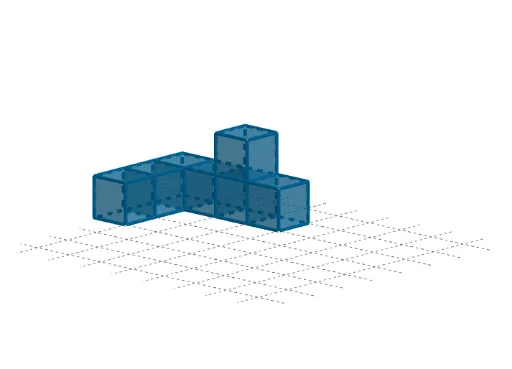
This example demonstrates how to draw a cube's front elevation, side elevation, and plan using GeoGebra. It involves core math concepts like solid geometry and orthographic projection. Construction highlights include using commands like Point and Cube, as detailed in the summary. Suitable for high school students learning 3D geometry and technical drawing.
GeoGebra Commands & Parameters
Point(Circle[B, Distance[A, B], Segment[A, B]]) → CCube(A, B, C) → a, D, faceCDHG, faceEFGH, edgeAD, edgeAB, edgeBC, edgeCD_1, edgeAE, edgeDH, edgeEH, edgeEF, E, edgeBF, edgeFG, edgeCG, edgeGH, F, G, H, faceABCD, faceADHE, faceABFE, faceBCGFPoint(Circle[C, Distance[D, C], Segment[D, C]]) → ICube(D, C, I) → b, J, faceIJNM, faceKLMN, edgeDJ, edgeCD, edgeCI, edgeIJ_1, edgeDK, edgeJN, edgeKN, edgeKL, K, edgeCL, edgeLM, edgeIM, edgeMN, L, M, N, faceCDJI, faceDJNK, faceCDKL, faceCIMLPoint(Circle[I, Distance[J, I], Segment[J, I]]) → OCube(J, I, O) → c, P, faceOPTS, faceQRST, edgeJP, edgeIJ, edgeIO, edgeOP, edgeJQ, edgePT, edgeQT, edgeQR, Q, edgeIR, edgeRS, edgeOS, edgeST, R, S, T, faceIJPO, faceJPTQ, faceIJQR, faceIOSRPoint(Circle[V, Distance[U, V], Segment[U, V]]) → WCube(U, V, W) → d, Z, face4, face5, edgeUZ, edgeUV, edgeVW, edgeWZ, edge1, edge4, edge6, edge5, A_1, edge2, edge7, edge3, edge8, B_1, C_1, D_1, faceUVWZ, face2, face1, face3Point(Circle[F_1, Distance[E_1, F_1], Segment[E_1, F_1]]) → G_1Cube(E_1, F_1, G_1) → e, H_1, face10, face11, edge10, edge9, edge12, edge14, edge11, edge16, edge18, edge17, I_1, edge13, edge19, edge15, edge20, J_1, K_1, L_1, face6, face8, face7, face9Point(Circle[N_1, Distance[M_1, N_1], Segment[M_1, N_1]]) → O_1Cube(M_1, N_1, O_1) → f, P_1, face16, face17, edge22, edge21, edge24, edge26, edge23, edge28, edge30, edge29, Q_1, edge25, edge31, edge27, edge32, R_1, S_1, T_1, face12, face14, face13, face15Point(Circle[T_1, Distance[L_1, T_1], Segment[L_1, T_1]]) → U_1Cube(L_1, T_1, U_1) → g, V_1, face22, face23, edge34, edge33, edge36, edge38, edge35, edge40, edge42, edge41, W_1, edge37, edge43, edge39, edge44, Z_1, A_2, B_2, face18, face20, face19, face21
AI Drawing Prompt Reference
Draw a cube's front, side, and top elevations. Start by constructing a cube, then project it from the front, side, and top to obtain the respective views. Each elevation should clearly show the cube's edges and faces, ensuring accurate projection relationships.
The prompt above was compiled from the original drawing commands and is for reference only.