
Cube Extension Demonstration
Loading the math board and drawing, please wait…
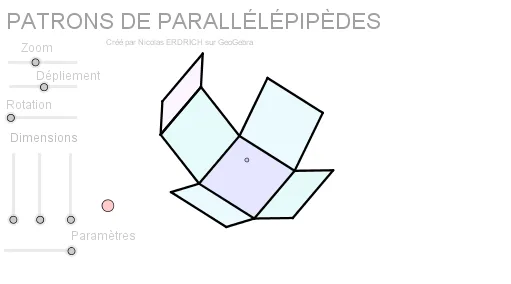
This example demonstrates the extension and transformation of a cube in 3D space, showcasing geometric transformations through rotations and scaling. It involves core math concepts like solid geometry, trigonometry, matrix transformations, and vector operations. Constructed using GeoGebra commands such as Sequence, Element, Polygon, and Segment, it builds the cube and its transformations. Suitable for high school students and math enthusiasts learning spatial geometry and transformations.
GeoGebra Commands & Parameters
Sequence((Mat * Element[cube, k]), k, 1, 8) → cube'Element(Element[AE, 3], 1) → droiteSequence(I + (Element[cube', k, 1, 1], Element[cube', k, 2, 1]), k, 1, 8) → listepointsElement(listepoints, 2) → AElement(listepoints, 1) → EElement(listepoints, 4) → C_1Element(listepoints, 3) → DPolygon(A, E, C_1, D) → poly1, a_1, b, c_1, dElement(listepoints, 6) → BElement(listepoints, 7) → FElement(listepoints, 8) → GElement(listepoints, 5) → HPolygon(B, F, G, H) → poly2, e, f, g, hElement(listepoints, 3) → CPolygon(F, C, A, B) → poly3, f_1, i, a_2, b_1Element(AB, 3, 1) → avantPolygon(C_1, G, H, E) → poly4, c_2, g_1, h_1, e_1Element(AC, 3, 1) → dessusPolygon(F, C, C_1, G) → poly5, f_2, c_3, c_4, g_2Polygon(A, B, H, E) → poly6, a_3, b_2, h_2, e_2Segment(E, A) → cSegment(A, C) → jSegment(A, B) → kSegment(C, C_1) → lSegment(C_1, E) → mSegment(A, B) → pSegment(B, H) → qSegment(H, E) → rSegment(H, G) → sSegment(B, F) → tSegment(G, C_1) → d_1Segment(F, G) → i_1Segment(F, C) → j_1Polygon(A, B, F', D') → poly7, a_4, b_3, f', d'Polygon(E, A, D'', C') → poly8, e_3, a_5, d'', c'Polygon(B, F'', G', H) → poly9, b_4, f'', g', h_3Polygon(H, G'', C''', E) → poly10, h_4, g'', c''', e_4Polygon(A_2, B_2, G'', C''') → poly11, a_6, b_5, g''_1, c'''_1
AI Drawing Prompt Reference
Demonstrate the extension and transformation of a cube in 3D space through rotations and scaling. Start by constructing a cube, then apply a series of transformations including rotations and scaling to show the transformed cube. Use polygons and segments to depict the faces and edges of the cube, ultimately forming an extended and transformed cube model.
The prompt above was compiled from the original drawing commands and is for reference only.