
Circle Area - Sector
Loading the math board and drawing, please wait…
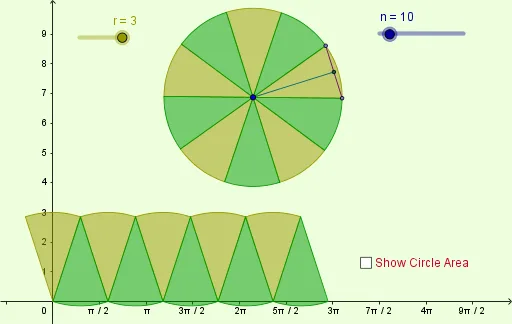
This example demonstrates how to calculate the area of a circle by dividing it into multiple sectors. Key math concepts include circle, sector area, line segment, and geometric construction. The construction uses GeoGebra commands and objects like Polygon, Circle, Point, Rotate, Segment, Midpoint, and Sequence to approximate the circle area calculation process by rotating and combining sectors. Suitable for middle school and above students to learn and understand the derivation of the circle area formula.
GeoGebra Commands & Parameters
Polygon((0, 0), (base, 0), (base, r), (0, r)) → poly1, a, b, c, dCircle(A, r) → ePoint(e) → BRotate(B, (360 * ° / n), A) → B'Segment(B, B') → dxMidpoint(dx) → CSegment(A, C) → dySequence(Rotate[B, ((j * 360) * ° / n), A], j, 0, n) → list1Sequence(CircleSector[A, Element[list1, j], Element[list1, j + 1]], j, 1, n, 2) → list2Sequence(CircleSector[A, Element[list1, j], Element[list1, j + 1]], j, 2, n, 2) → list3Sequence(CircleSector[((j * dx), 0), ((j * dx) + dx / 2, dy), ((j * dx) + ((-dx)) / 2, dy)], j, 0, n / 2 - 1) → list4Sequence(CircleSector[((j * dx) + dx / 2, dy), ((j * dx) + 0, 0), ((j * dx) + dx, 0)], j, 0, n / 2 - 1) → list5