
Beehive Hexagon Surface Area Minimum
Loading the math board and drawing, please wait…
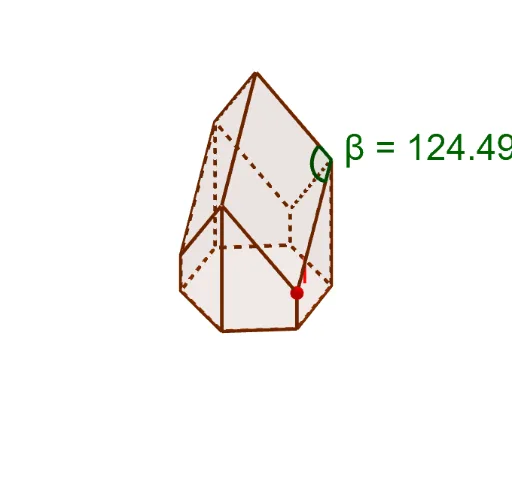
This example demonstrates the minimum surface area of a beehive hexagon. Key mathematical concepts include derivatives and calculus. Using commands like Point, Rotate, Polygon, etc., from the construction summary, a beehive model can be constructed. Suitable for high school math education and learning optimization problems with derivatives.
GeoGebra Commands & Parameters
Point(xAxis) → ARotate(A, 60°, zAxis) → A'Rotate(A, (-(60°)), zAxis) → A'_1Rotate(A'_1, (-(60°)), zAxis) → BRotate(B, (-(60°)), zAxis) → B'Rotate(B', (-(60°)), zAxis) → B''Polygon(B, A'_1, A, A', B'', B') → poly1, b, a'_1, a, a', b'', b'OrthogonalLine(B, xOyPlane) → fPoint(f) → HPrism(poly1, H) → c, C, faceB'B''FG, faceBB'GH, faceCDEFGH, edgeBH, edge1, edgeAD, edgeA'E, edgeB''F, edgeB'G, edgeCH, D, edgeCD, edgeDE, edgeEF, edgeFG, edgeGH, E, F, G, face2, face1, faceAA'ED, faceA'B''FEPoint(edgeBH) → IPlane(I, C, G) → dIntersect(zAxis, d) → JRotate(I, 120°, zAxis) → I'Rotate(I', 120°, zAxis) → I''Polygon(I, C, J, G) → q1, i, c_1, j, gPolygon(I', C, J, E) → q2, i', c_2, j_1, ePolygon(I'', E, J, G) → q3, i'', e_1, j_2, g_1Polygon(G, B', B, I) → q4, g_2, h, b_1, i_1Polygon(G, B', B'', I'') → q5, g_3, k, l, mPolygon(B'', I'', E, A') → q6, n, p, e_2, qPolygon(A', E, I', A) → q7, r, e_3, s, a_1Polygon(A, I', C, A'_1) → q8, a_2, t, c_3, f_1Polygon(A'_1, C, I, B) → q9, h_1, c_4, i_2, b_2PointIn(q9) → Pointq9Angle(I, C, J) → βOrthogonalLine(K, xAxis) → k_1OrthogonalLine(K, k_1) → l_1
AI Drawing Prompt Reference
Draw a beehive hexagon model by first creating point A on the x-axis and then rotating it around the z-axis to form the other vertices of the hexagon. Construct the hexagon and its plane, and then create multiple triangles and planes through rotation and translation to form the 3D model of the beehive hexagon.
The prompt above was compiled from the original drawing commands and is for reference only.