
Cube Dissection Demo
Loading the math board and drawing, please wait…
In collections
Dissecting a cube into equal parts
From POST-IT to 3D PRINTING: playing with squares and cubes
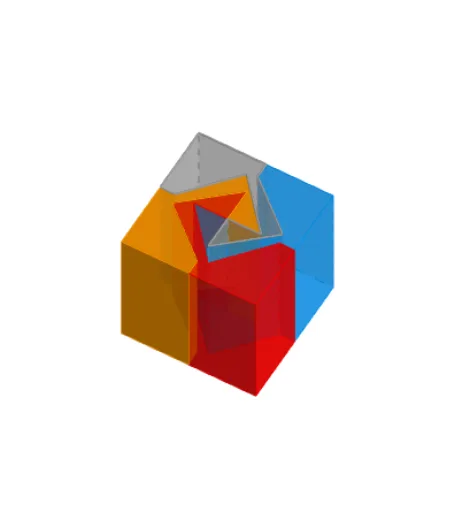
This example demonstrates how to dissect a cube into four equal parts. It involves core mathematical concepts such as solid geometry, geometric transformations (reflection, rotation, translation), and similarity transformations. Key GeoGebra commands and objects used in the construction include Intersect, Point, Polygon, Midpoint, Segment, Circle, LineBisector, Line, Mirror, Rotate, Prism, Vector, and Translate. Suitable for high school and above students studying solid geometry, geometric transformations, and spatial reasoning.
GeoGebra Commands & Parameters
Intersect(xAxis, yAxis) → APoint(xAxis) → EPolygon(E, F, 4) → poly2, j, k, l, m, G, HMidpoint(j) → LMidpoint(l) → KSegment(K, L) → pPoint(p) → UPoint(p) → TMidpoint(U, T) → H_1Circle(H_1, 0.95) → d_2LineBisector(T, U) → eIntersect(d_2, e, 2) → I_1Segment(H_1, I_1) → l_1Polygon(A, B, 4) → poly1, f, g, h, i, C, DMidpoint(h) → IMidpoint(f) → JSegment(I, J) → nPoint(n) → MMidpoint(I, J) → NCircle(M, 0.2) → cIntersect(c, n, 2) → OLine(M, h) → qLine(O, q) → rPoint(q) → PLine(P, n) → sIntersect(r, s) → QMirror(P, N) → P'Mirror(Q, N) → Q'Mirror(O, N) → O'Mirror(M, N) → M'Polygon(D, I, J, A, M, P, Q, O, O', Q', P', M') → poly3, d, m', j_1, a, i_1, m_1, p_1, q_1, o, o', q', p'Polygon(C, I, J, B, M, P, Q, O, O', Q', P', M') → poly4, c_1, m'_1, j_2, b, i_2, m_2, p_2, q_2, o_1, o'_1, q'_1, p'_1Midpoint(m) → RMidpoint(k) → SSegment(R, S) → tIntersect(t, p) → WRotate(T, 90°, W) → T'Point(l_1) → VRotate(V, 90°, W) → V'Rotate(U, 90°, W) → U'Polygon(K, H, R, T', V', U', W, U, V, T) → poly5, k_1, t_1, h_1, r_1, t', v', u', w, u_3, vRotate(K, 90°, W) → K'Rotate(H, 90°, W) → H'Rotate(R, 90°, W) → R'Rotate(T', 90°, W) → T''Rotate(V', 90°, W) → V''Rotate(U', 90°, W) → U''Rotate(W, 90°, W) → W'Rotate(U, 90°, W) → U'_1Rotate(V, 90°, W) → V'_1Rotate(T, 90°, W) → T'_1Polygon(K', H', R', T'', V'', U'', W', U'_1, V'_1, T'_1) → poly5', k', t'_1, h', r', t'', v'', u'', w', u'_1, v'_1Rotate(K', 90°, W) → K''Rotate(H', 90°, W) → H''Rotate(R', 90°, W) → R''Rotate(T'', 90°, W) → T'''Rotate(V'', 90°, W) → V'''Rotate(U'', 90°, W) → U'''Rotate(W', 90°, W) → W''Rotate(U'_1, 90°, W) → ZRotate(V'_1, 90°, W) → A_1Rotate(T'_1, 90°, W) → B_1Polygon(K'', H'', R'', T''', V''', U''', W'', Z, A_1, B_1) → poly5'', k'', b_1, h'', r'', t''', v''', u''', w'', z_1, a_1Rotate(K'', 90°, W) → K'''Rotate(H'', 90°, W) → H'''Rotate(R'', 90°, W) → R'''Rotate(T''', 90°, W) → C_1Rotate(V''', 90°, W) → D_1Rotate(U''', 90°, W) → E_1Rotate(W'', 90°, W) → W'''Rotate(Z, 90°, W) → Z'Rotate(A_1, 90°, W) → F_1Rotate(B_1, 90°, W) → G_1Polygon(K''', H''', R''', C_1, D_1, E_1, W''', Z', F_1, G_1) → poly5''', k''', g_1, h''', r''', c_2, d_1, e_1, w''', z', f_1Prism(poly5, n_1) → prism1, R_1, C_2, face12, face13, face15, face20, face21, face19, face18, face17, face16, S_1, face14, face22, edge22, edge21, edge23, edge28, edge29, edge30, edge27, edge25, T_1, edge26, edge24, edge31, edge33, edge34, edge35, edge36, edge37, edge38, edge39, U_1, edge40, edge32, V_1, W_1, Z_1, A_2, B_2Segment(W, K_1) → s_1Segment(W, L_1) → f_2Circle(W, (a_2 * s_1)) → e_2Intersect(s_1, e_2, 1) → M_1Intersect(f_2, e_2, 1) → N_1Vector(W, M_1) → uVector(W, N_1) → u_1Translate(prism1, Vector[(-u_1)]) → prism1'Prism(poly5''', b_2) → prism2, K_2, T_2, face23, face25, face26, face27, face28, face29, face30, face31, face32, L_2, face24, face33, edge41, edge42, edge43, edge44, edge45, edge46, edge47, edge48, M_2, edge49, edge50, edge51, edge53, edge54, edge55, edge56, edge57, edge58, edge59, N_2, edge60, edge52, O_2, P_2, Q_2, R_2, S_2Translate(prism2, u) → prism2'Prism(poly5', g_2) → prism4, U_2, F_3, face34, face36, face37, face38, face39, face40, face41, face42, face43, V_2, face35, face44, edge61, edge62, edge63, edge64, edge65, edge66, edge67, edge68, W_2, edge69, edge70, edge71, edge73, edge74, edge75, edge76, edge77, edge78, edge79, Z_2, edge80, edge72, A_3, B_3, C_3, D_3, E_3Prism(poly5'', k_2) → prism3, G_3, P_3, face45, face47, face48, face49, face50, face51, face52, face53, face54, H_3, face46, face55, edge81, edge82, edge83, edge84, edge85, edge86, edge87, edge88, I_3, edge89, edge90, edge91, edge93, edge94, edge95, edge96, edge97, edge98, edge99, J_3, edge100, edge92, K_3, L_3, M_3, N_3, O_3Translate(prism3, u_1) → prism3'Translate(prism4, Vector[(-u)]) → prism4'
AI Drawing Prompt Reference
Draw a cube and demonstrate how to dissect it into four equal parts. Start by plotting the intersection point of the coordinate axes and the vertices of the cube, then create the faces of the cube. Find midpoints of key points and draw segments and circles. Use intersections of midpoints and circles to create auxiliary segments and new points. Apply mirror and rotation transformations to parts of the cube, then combine all sections to show the dissection effect.
The prompt above was compiled from the original drawing commands and is for reference only.