
Cube Diagonal Perpendicular Sections
Loading the math board and drawing, please wait…
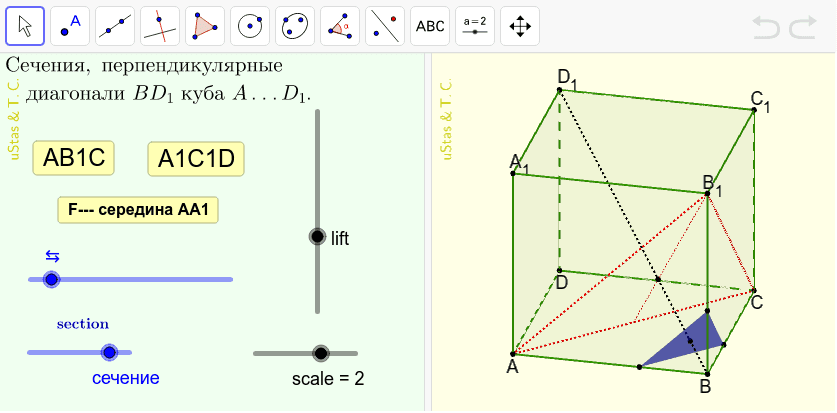
This example demonstrates the various cross-sections of a cube that are perpendicular to one of its diagonals. It involves core mathematical concepts like solid geometry, polygons, vectors, and transformations. Construction highlights the use of commands such as RotateText, Mirror, Polygon, Prism, Dilate, If, Segment, Midpoint, and Intersect in GeoGebra, emphasizing spatial visualization, geometric transformations, and section analysis. Suitable for high school and above students learning about 3D geometry, cross-sections, and spatial reasoning.
GeoGebra Commands & Parameters
RotateText("uStas\;\&\,Т.С.", 90°) → надпись01Mirror(A, y + (0 * z) = 0) → BMirror(A, Q) → CMirror(B, Q) → DPolygon(A, B, C, D) → ABCD, a, b, c, dPrism(ABCD, (h * scale)) → f, A_1, R1, R2, R3, R4, R5, R6, R7, R8, B_1, C_1, D_1, грань1, грань2, грань3, грань4, грань5Dilate(A, k, B) → A'Dilate(B_1, k, B) → B'Dilate(C, k, B) → C'Dilate(A_1, 3 - k, D_1) → K1Dilate(D, 3 - k, D_1) → M1Dilate(C_1, 3 - k, D_1) → V1Dilate(A_1, k - 1, B_1) → K2Dilate(A_1, k - 1, A) → L2Dilate(D, k - 1, A) → M2Dilate(D, k - 1, C) → N2Dilate(C_1, k - 1, C) → P2Dilate(C_1, k - 1, B_1) → V2If(L_1, Polygon[A', C', B'], If[L_2, Polygon[K2, L2, M2, N2, P2, V2], Polygon[K1, M1, V1]]) → s2Polygon(A, C, B_1) → s1, b_1, a_1, c_1Segment(B_1, Q) → gSegment(B, D_1) → BD1Midpoint(A, A_1) → FIntersect(BD1, g) → EDilate(D_1, k / 3, B) → G
AI Drawing Prompt Reference
Draw a cube and show its cross-sections perpendicular to one of its diagonals. Start by creating a cube, then generate the four vertices of the cross-section through mirroring and rotating operations. Use these vertices to construct a quadrilateral. Next, create other parts of the cross-section using mirroring and scaling operations. Finally, connect key points to form the cross-section and demonstrate its relationship with the cube.
The prompt above was compiled from the original drawing commands and is for reference only.