
Parallelepiped Section
Loading the math board and drawing, please wait…
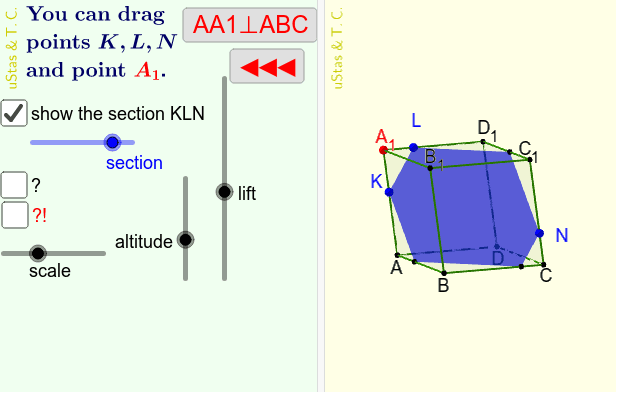
This example demonstrates the section of a parallelepiped. Key mathematical concepts include the properties of sections in solid geometry. Using GeoGebra commands such as RotateText, Mirror, Rotate, etc., the construction of a parallelepiped and its section is achieved. Suitable for high school students studying solid geometry.
GeoGebra Commands & Parameters
RotateText("uStas\;\&\,Т.С.", 90°) → надпись01Mirror(A, Q) → CRotate(A, 90°, Q) → BMirror(B, Q) → DPolygon(A, B, C, D) → ABCD, a, b, c, dPointIn(z = (h * m) + zQ) → A_1Prism(ABCD, A_1) → Π, B_1, BB1, CC1, DD1, a_1, b_1, c_1, d_1, C_1, D_1, g_1, g_2, g_3, g_4, ABCD1, AA1Point(d_1) → LPoint(CC1) → NPoint(sp1) → KPathParameter(K) → kPlane(K, L, N) → αIntersectPath(α, Π) → ss1, E, j, l, n, F, G, H, I, J, f, g, iLine(K, N) → KNLine(K, L) → KLIntersect(KN, Line[B, C]) → P1Intersect(KN, Line[B, B_1]) → P2Intersect(KN, Line[C_1, B_1]) → P3If(Distance[P1, B] < Distance[P1, C], Segment[P1, B], Segment[P1, C]) → p1If(Distance[P2, B] < Distance[P2, B_1], Segment[P2, B], Segment[P2, B_1]) → p2If(Distance[P3, B_1] < Distance[P3, C_1], Segment[P3, B_1], Segment[P3, C_1]) → p3If(Distance[P1, K] < Distance[P1, N], Segment[P1, K], Segment[P1, N]) → p_1Segment(P2, K) → p_2If(Distance[P3, K] < Distance[P3, N], Segment[P3, K], Segment[P3, N]) → p_3Intersect(KN, Line[D, C]) → Q1Intersect(KN, Line[D, D_1]) → Q2Intersect(KN, Line[C_1, D_1]) → Q3If(Distance[Q1, C] < Distance[Q1, D], Segment[Q1, C], Segment[Q1, D]) → q1If(Distance[Q2, D] < Distance[Q2, D_1], Segment[Q2, D], Segment[Q2, D_1]) → q2If(Distance[Q3, C_1] < Distance[Q3, D_1], Segment[Q3, C_1], Segment[Q3, D_1]) → q3If(Distance[Q1, K] < Distance[Q1, N], Segment[Q1, K], Segment[Q1, N]) → q_1Segment(Q2, K) → q_2If(Distance[Q3, K] < Distance[Q3, N], Segment[Q3, K], Segment[Q3, N]) → q_3Intersect(KL, Line[D, A]) → R1Intersect(KL, Line[A_1, A]) → R2Intersect(KL, Line[D_1, D]) → R3If(Distance[R1, A] < Distance[R1, D], Segment[R1, A], Segment[R1, D]) → r1If(Distance[R2, A] < Distance[R2, A_1], Segment[R2, A], Segment[R2, A_1]) → r2If(Distance[R3, D] < Distance[R3, D_1], Segment[R3, D], Segment[R3, D_1]) → r3If(Distance[R1, K] < Distance[R1, L], Segment[R1, K], Segment[R1, L]) → r_1If(Distance[R2, K] < Distance[R2, L], Segment[R2, K], Segment[R2, L]) → r_2If(Distance[R3, K] < Distance[R3, L], Segment[R3, K], Segment[R3, L]) → r_3Intersect(KL, Line[A_1, B_1]) → S1Intersect(KL, Line[C_1, B_1]) → S2Intersect(KL, Line[C_1, D_1]) → S3If(Distance[S1, A_1] < Distance[S1, B_1], Segment[S1, A_1], Segment[S1, B_1]) → s1If(Distance[S2, C_1] < Distance[S2, B_1], Segment[S2, C_1], Segment[S2, B_1]) → s2If(Distance[S3, C_1] < Distance[S3, D_1], Segment[S3, C_1], Segment[S3, D_1]) → s3If(Distance[S1, K] < Distance[S1, L], Segment[S1, K], Segment[S1, L]) → s_1If(Distance[S2, K] < Distance[S2, L], Segment[S2, K], Segment[S2, L]) → s_2If(Distance[S3, K] < Distance[S3, L], Segment[S3, K], Segment[S3, L]) → s_3
AI Drawing Prompt Reference
Draw a parallelepiped with a square base, whose vertices are obtained by rotation and reflection. Choose a point above the base to form the prism. Select three points on the edges of the prism to define a cutting plane. This plane intersects the edges of the prism, forming a cross-section polygon. At the intersection points, based on distance comparisons, draw segments between the section and the prism edges, as well as internal segments of the section, clearly showing the shape of the cross-section of the parallelepiped cut by the plane.
The prompt above was compiled from the original drawing commands and is for reference only.