
Cube Cutting Demonstration
Loading the math board and drawing, please wait…
In collections
学习 GeoGebra 经典应用
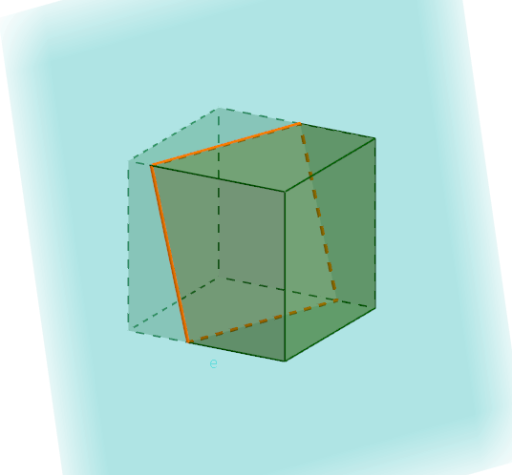
This example dynamically demonstrates the process of cutting a cube, visually showing the intersection lines between the cutting plane and the cube's faces. It involves core mathematical concepts such as spatial geometry, similar triangles, definite integrals, and standard deviation. GeoGebra commands and objects like Intersect, Point, Cube, and IntersectPath are used in the construction. Suitable for high school students and math enthusiasts studying solid geometry and calculus.
GeoGebra Commands & Parameters
Intersect(xAxis, zAxis) → APoint(xAxis) → BPoint(Circle[B, Distance[A, B], Segment[A, B]]) → CCube(A, B, C) → f, D, faceCDHG, faceEFGH, edgeAD, edgeAB, edgeBC, edgeCD, edgeAE, edgeDH, edgeEH, edgeEF, E, edgeBF, edgeFG, edgeCG, edgeGH, F, G, H, faceABCD, faceADHE, faceABFE, faceBCGFIntersectPath(e, f) → poly1, I, j, k, l, J, K, L, M, N, g, h, i
AI Drawing Prompt Reference
Create a 3D scene with a cube in space, together with three mutually perpendicular coordinate axes to set the reference. Start by using the intersection point of two axes as the base reference, then choose an additional point on the remaining direction to determine the cube’s size and orientation. Construct the cube’s vertices and its faces so the cube shows the relevant visible face patches and edges. Finally, introduce a cutting plane and draw the intersection between the plane and the cube, tracing the resulting polyline-like cutting curve as it passes through the cube’s faces, illustrating how the cut contour lies across the solid.
The prompt above was compiled from the original drawing commands and is for reference only.