
Conic Sections: Plane Intersecting a Cone
Loading the math board and drawing, please wait…
In collections
学习 GeoGebra 经典应用
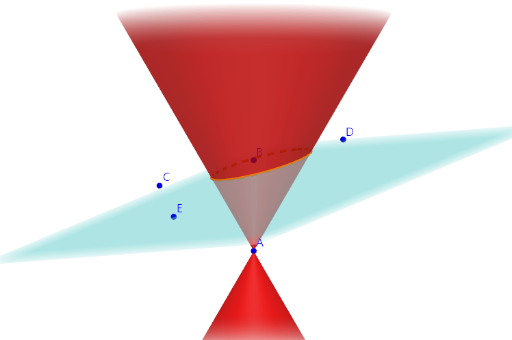
This example demonstrates how conic sections are formed when a plane intersects an infinite cone. Using GeoGebra's InfiniteCone command to create the cone, Plane command to create an adjustable cutting plane, and IntersectPath command to draw the intersection curve, it visually shows the formation of ellipse, hyperbola, and parabola. Core mathematical concepts include the definition of conic sections (intersection of a plane with a cone) and classification conditions based on the angle between the plane and cone axis. Construction points: adjust the plane's position and angle to observe different curve types. Suitable for high school coordinate geometry teaching, connecting solid and plane geometry, and introducing conic section concepts for grades 10-12.
GeoGebra Commands & Parameters
InfiniteCone(A, B - A, 30°) → conePlane(C, D, E) → aIntersectPath(a, cone) → c
AI Drawing Prompt Reference
Draw an infinite cone and use a plane that can be adjusted in position and angle to intersect the cone, observing the formation of an ellipse, hyperbola, and parabola. First, draw the infinite cone, then draw the plane, and finally find the intersection curve between the plane and the cone.
The prompt above was compiled from the original drawing commands and is for reference only.