
Cube Construction and Geometric Relations Demo
Loading the math board and drawing, please wait…
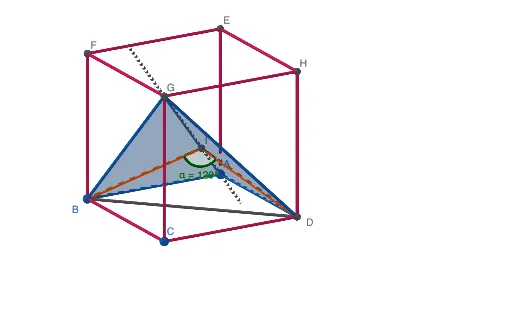
This example dynamically demonstrates the construction of a cube and its geometric relationships, visually presenting the 2D representation of a 3D shape. It involves core mathematical concepts such as solid geometry, polygons, line-plane relationships, Pythagorean theorem, and trigonometric function applications. The construction utilizes GeoGebra commands/objects like Point, Cube, Polygon, Line, OrthogonalLine, Intersect, Segment, Angle. Suitable for high school students and math enthusiasts for learning solid geometry and spatial visualization skills.
GeoGebra Commands & Parameters
Point(yAxis) → APoint(xAxis) → BPoint(Circle[B, Distance[A, B], Segment[A, B]]) → CCube(A, B, C) → a, D, faceCDHG, faceEFGH, edgeAD, edgeAB, edgeBC, edgeCD, edgeAE, edgeDH, edgeEH, edgeEF, E, edgeBF, edgeFG, edgeCG, edgeGH, F, G, H, faceABCD, faceADHE, faceABFE, faceBCGFPolygon(G, D, A) → t1, a_1, g, dPolygon(G, A, B) → t2, b, g_1, a_2Line(G, A) → fOrthogonalLine(D, f, space) → hOrthogonalLine(B, f, space) → iIntersect(f, h) → ISegment(D, I) → jSegment(I, B) → kSegment(D, B) → lAngle(B, I, D) → α
AI Drawing Prompt Reference
Draw a cube and its 2D projection. Start by plotting three points to define the cube's vertices, then construct the cube. Next, draw the base polygon of the cube from one vertex and draw a horizontal line from one vertex of the base polygon. Then, draw a vertical line from another vertex of the cube that intersects the horizontal line. Find the intersection point of these two lines. Finally, connect the intersection point to relevant vertices of the cube to form the diagonals of the base polygon and label one of the interior angles of the base polygon.
The prompt above was compiled from the original drawing commands and is for reference only.