
Cube and Octahedron
Loading the math board and drawing, please wait…
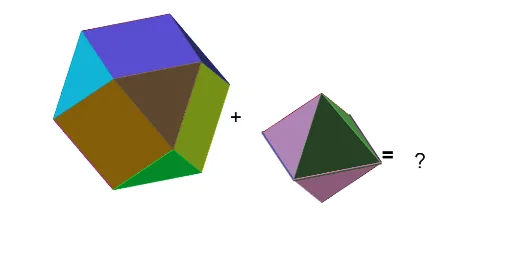
This example demonstrates the relationship between a cube and an octahedron. Key mathematical concepts include solid geometry. Using GeoGebra commands such as Point, Cube, Rotate, etc., the faces and edges of the cube can be constructed. Suitable for students at the junior high school level and above.
GeoGebra Commands & Parameters
Point(Circle[B, Distance[A, B], Segment[A, B]]) → CCube(A, B, C) → a, D, faceCDHG, faceEFGH, arêteAD, arêteAB, arêteBC, arêteCD, arêteAE, arêteDH, arêteEH, arêteEF, E, arêteBF, arêteFG, arêteCG, arêteGH, F, G, H, faceABCD, faceADHE, faceABFE, faceBCGFPoint(arêteAE, 1 - p) → KaPoint(arêteAB, p) → IaPoint(arêteAD, 1 - p) → JaRotate(Ja, 90°, zAxis) → JbRotate(Ka, 90°, zAxis) → KbPyramid(Polygon[Ia, Ja, Ka], A) → pyrA, faceAIaJa, faceAJaKa, faceAIaKa, arêteAIa, arêteAJa, arêteAKaPolygon(Ia, Ja, Ka) → triA, ka, ia, jaPlane(xAxis, yAxis) → oMirror(Ka, o) → KeMirror(Ia, o) → IeMirror(Jb, o) → JfMirror(Kb, o) → KfPolygon(Ia, Jb, Kb, Kf, Jf, Ie, Ke, Ka) → fab, ia_1, jb_1, kb_1, kf, jf, ie, ke_1, ka_2Rotate(fab, 90°, zAxis) → fbcRotate(fab, 180°, zAxis) → fcdRotate(fab, (-(90°)), zAxis) → fdaRotate(fab, (-(90°)), arêteAB) → fsousRotate(fab, 90°, arêteEF) → fsurCircumcircleArc(A, I, J) → cTranslate(Rotate[pyrA, (Answer * α), arêteAE], Vector[A, Point[c, Answer]]) → pyramARotate(triA, 90°, zAxis) → triBRotate(triA, 180°, zAxis) → triCRotate(triA, (-(90°)), zAxis) → triDMirror(triA, o) → triERotate(triE, 90°, zAxis) → triFRotate(triE, 180°, zAxis) → triGRotate(triE, (-(90°)), zAxis) → triHCircumcircleArc(B, K, J) → dTranslate(Rotate[Rotate[pyrA, 90°, zAxis], (Answer * α), arêteBF], Vector[B, Point[d, Answer]]) → pyramBCircumcircleArc(C, L, J) → eCircumcircleArc(D, M, J) → fTranslate(Rotate[Rotate[pyrA, 180°, zAxis], (Answer * α), arêteCG], Vector[C, Point[e, Answer]]) → pyramCTranslate(Rotate[Rotate[pyrA, (-(90°)), zAxis], ((-Answer) * α), arêteDH], Vector[D, Point[f, Answer]]) → pyramDMirror(pyramD, o) → pyramHMirror(pyramA, o) → pyramEMirror(pyramB, o) → pyramFMirror(pyramC, o) → pyramGMidpoint(J, Kb) → NMirror(N, O) → N'Mirror(N, O) → N'_1Mirror(A, O) → A'Mirror(N, O) → N'_2
AI Drawing Prompt Reference
Draw a cube and an octahedron that share a plane. Start by creating a cube, then generate multiple triangles by rotating around the cube's edges, which will form the faces of the octahedron. Use mirroring and rotating operations to create the remaining parts of the octahedron, resulting in a structure where the cube and octahedron share a plane.
The prompt above was compiled from the original drawing commands and is for reference only.