
Crossing a Sphere and Comparing with Cone and Cylinder
Loading the math board and drawing, please wait…
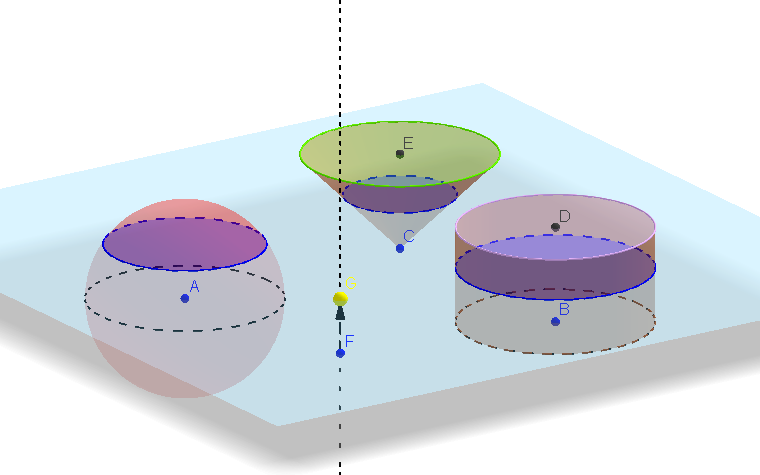
This example demonstrates how to compare the cross-sections of a sphere, cone, and cylinder. The key mathematical concepts involve solid geometry, cross-section analysis, and geometric transformations. Construction involves using GeoGebra commands such as OrthogonalLine, Circle, Sphere, Cylinder, Cone, and others. Suitable for high school students or college freshmen to learn solid geometry and spatial visualization.
GeoGebra Commands & Parameters
OrthogonalLine(A, xOyPlane) → aCircle(A, 2, a) → cVector(A, B) → uTranslate(c, u) → c'Sphere(A, 2) → bCylinder(B, D, 2) → d, e, f, gOrthogonalLine(F, xOyPlane) → jPoint(j) → GOrthogonalPlane(G, j) → lIntersectPath(l, b) → qIntersectPath(l, d) → rVector(A, E) → vTranslate(c, v) → c'_1Cone(E, C, 2) → h, k, iIntersectPath(l, h) → pCorner(p)Vector(F, G) → w
AI Drawing Prompt Reference
Draw a sphere and a cone, along with their cross-sections compared to a cylinder. Start by drawing a perpendicular line from the center of the sphere to the plane, then draw a circle centered on this line. Translate the circle along the perpendicular line. Next, take a point on the translated circle and draw a cone with this point as the vertex, showing its cross-section with the sphere. Finally, draw a cylinder and compare its cross-section with the sphere, all cross-sections should be in the same plane.
The prompt above was compiled from the original drawing commands and is for reference only.