
Cross Sections of Tumbling Cone
Loading the math board and drawing, please wait…
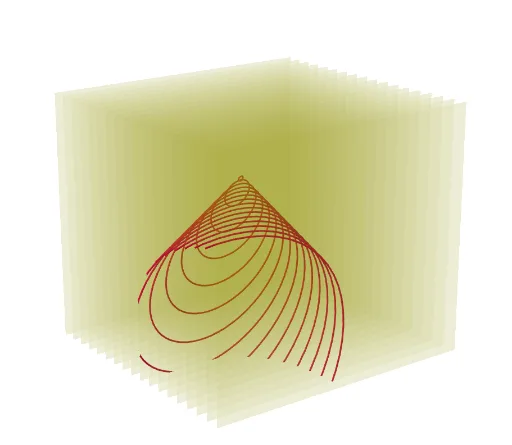
This example demonstrates the cross-section of a rotating cone at various heights. The key mathematical concepts involve cone geometry, equations of circles, and intersection points between the cone and circles. Construction requires using GeoGebra commands like Line, Circle, Cone, Rotate, and Sequence to create the cone, rotation axis, and cross-sections. Suitable for high school students or college undergraduates for learning solid geometry and coordinate geometry, useful in math teaching or geometric exploration.
GeoGebra Commands & Parameters
Line(A, B) → fCircle(B, 3, f) → cCone(B, A, 3) → a, d, bRotate(a, n, xAxis) → a'Sequence(IntersectPath[y + (0 * z) = w, a'], w, -5, 5, 0.5) → l1Sequence(Polygon[(-5, w, -5), (5, w, -5), (5, w, 5), (-5, w, 5)], w, -5, 5, 0.5) → l2
AI Drawing Prompt Reference
Draw a rotating cone and show its cross-sections at various heights. Start by creating a straight line as the rotation axis, then draw a circle centered on this line. Use the line and circle to form a cone. Rotate the cone around the axis to generate cross-sections at multiple heights, which are circles. Finally, represent these cross-sections as polygons to visualize the cone's shape at different levels.
The prompt above was compiled from the original drawing commands and is for reference only.