
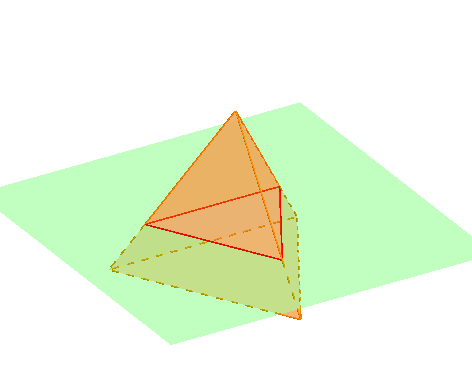
Cross Sections of a Regular Tetrahedron
Loading the math board and drawing, please wait…
In collections
Sections of 3D Shapes
This example demonstrates the cross sections of a regular tetrahedron. Key mathematical concepts include the properties of sections in solid geometry. Using GeoGebra commands such as Point, Circle, Rotate, Tetrahedron, etc., the construction of a regular tetrahedron and its sections is illustrated. Suitable for high school geometry learners and educators.
GeoGebra Commands & Parameters
Point(xAxis) → ACircle(zAxis, A) → cRotate(A, (-(120°)), zAxis) → A'Point(Circle[Midpoint[A', A], (Distance[A', A] * sqrt(3) / 2), Segment[A', A]]) → BTetrahedron(A', A, B) → a, C, edgeBC, edgeAC, faceAA'B, faceA'BC, faceAA'C, faceABC, edgeA'B, edgeAA', edgeAB, edgeA'CTranslate(Rotate[Rotate[Plane[xAxis, yAxis], α, xAxis], rr, zAxis], Vector[(0, 0, ud)]) → bIntersectPath(b, a) → poly1, D, E, F, G, f, g, h, iRotate(Rotate[Translate[poly1, Vector[(0, 0, (-ud))]], (-rr), zAxis], (-α), xAxis) → poly2
AI Drawing Prompt Reference
Draw a cross-section of a regular tetrahedron to illustrate the properties of sections in solid geometry. Begin by constructing a 3D coordinate system containing the tetrahedron, then generate the cross-section through rotation and intersection operations, and finally combine the cross-section with the tetrahedron to display a clear shape and geometric relationship.
The prompt above was compiled from the original drawing commands and is for reference only.