
Cross Sections of a Rectangular Prism by Chi Tran
Loading the math board and drawing, please wait…
In collections
Cross Sections
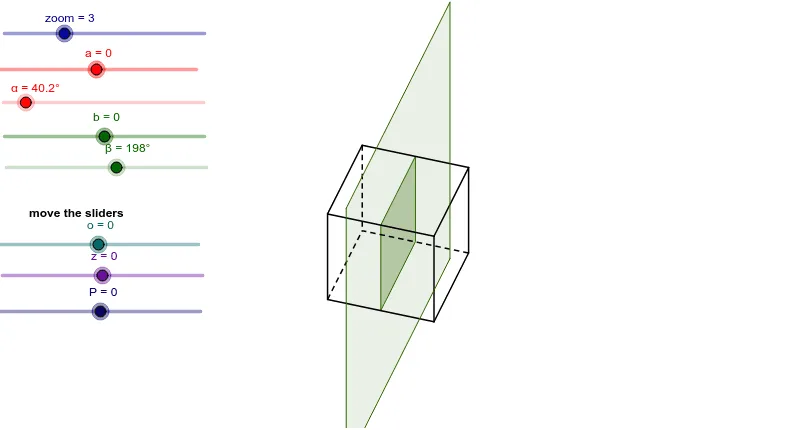
This example explores the different cross sections of a rectangular prism to help students understand the concept of cross sections in solid geometry. Key mathematical concepts include the properties of cross sections in solid geometry. It utilizes commands such as Odcinek_3D, Element, and Polygon in GeoGebra, suitable for middle school and above students.
GeoGebra Commands & Parameters
Odcinek_3D(D1, D5, D4, D2) → c, dOdcinek_3D(D1, D2, D5, D4) → e, fOdcinek_3D(D1, D4, D2, D5) → g, hOdcinek_3D(D2, D6, D1, D3) → i, jOdcinek_3D(D2, D3, D6, D1) → k, lOdcinek_3D(D3, D7, D2, D4) → m, nOdcinek_3D(D3, D4, D7, D2) → p, qOdcinek_3D(D4, D8, D3, D1) → s, tOdcinek_3D(D8, D5, D7, D4) → a_1, b_1Odcinek_3D(D8, D7, D4, D5) → c_1, d_1Odcinek_3D(D7, D6, D3, D8) → e_1, f_1Odcinek_3D(D6, D5, D2, D7) → g_1, h_1Element(Join[B10], 1) → C10Element(Join[B10], 2) → D10Element(Join[B10], 3) → E10Element(Join[B11], 1) → C11Element(Join[B11], 2) → D11Element(Join[B11], 3) → E11Element(Join[B12], 1) → C12Element(Join[B12], 2) → D12Element(Join[B12], 3) → E12Element(Join[B13], 1) → C13Element(Join[B13], 2) → D13Element(Join[B13], 3) → E13Element(Join[B14], 1) → C14Element(Join[B14], 2) → D14Element(Join[B14], 3) → E14Polygon(F12, F13, F10, F11) → poly1, f12, f13, f10, f11IloczynSkalarny3D(B14, B15) → C15IloczynSkalarny3D(B15, C17) → E17IloczynSkalarny3D(B15, C18) → E18IloczynSkalarny3D(B15, C19) → E19IloczynSkalarny3D(B15, C20) → E20IloczynSkalarny3D(B15, C21) → E21IloczynSkalarny3D(B15, C22) → E22IloczynSkalarny3D(B15, C23) → E23IloczynSkalarny3D(B15, C24) → E24IloczynSkalarny3D(B15, C25) → E25IloczynSkalarny3D(B15, C26) → E26IloczynSkalarny3D(B15, C27) → E27IloczynSkalarny3D(B15, C28) → E28If((F17 ≥ 0) ∧ (F17 ≤ 1), F17) → G17If((F18 ≥ 0) ∧ (F18 ≤ 1), F18) → G18If((F19 ≥ 0) ∧ (F19 ≤ 1), F19) → G19If((F20 ≥ 0) ∧ (F20 ≤ 1), F20) → G20If((F21 ≥ 0) ∧ (F21 ≤ 1), F21) → G21If((F22 ≥ 0) ∧ (F22 ≤ 1), F22) → G22If((F23 ≥ 0) ∧ (F23 ≤ 1), F23) → G23If((F24 ≥ 0) ∧ (F24 ≤ 1), F24) → G24If((F25 ≥ 0) ∧ (F25 ≤ 1), F25) → G25If((F26 ≥ 0) ∧ (F26 ≤ 1), F26) → G26If((F27 ≥ 0) ∧ (F27 ≤ 1), F27) → G27If((F28 ≥ 0) ∧ (F28 ≤ 1), F28) → G28RemoveUndefined(list1) → list2Sequence(Angle[Element[list2, 1], F14, Element[list2, i]], i, 1, Length[list2]) → list3Sort(list3) → list4Sequence(Sequence[If[Element[list3, j] ≟ Element[list4, i], Element[list2, j]], j, 1, Length[list2]], i, 1, Length[list4]) → list5RemoveUndefined(Join[list5]) → list6Polygon(list6) → wielokąt1, , , ,
AI Drawing Prompt Reference
Draw a rectangular prism and show its different cross-sections at various positions. Start by drawing the vertices of the prism, then draw line segments connecting these vertices to form the edges of the prism. Next, cut the prism at different positions, such as from vertex D1 to vertices D5, D4, and D2, forming a quadrilateral. Repeat this process from other vertices to cut out different cross-sections, ultimately resulting in multiple quadrilaterals to demonstrate the prism's cross-section characteristics.
The prompt above was compiled from the original drawing commands and is for reference only.