
Creating Rectangular Prisms with Given Surface Area
Loading the math board and drawing, please wait…
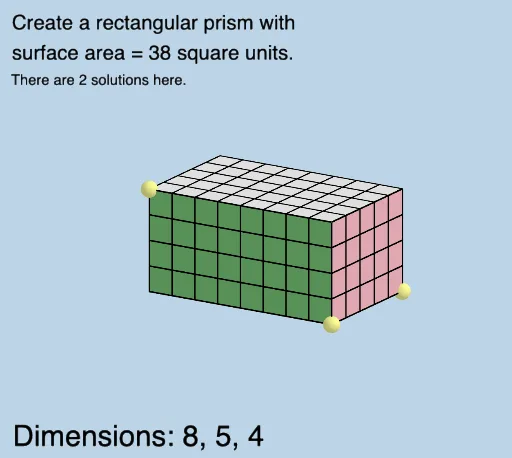
This example demonstrates how to construct rectangular prisms with a specified surface area using GeoGebra. It involves core concepts like surface area calculation, solid geometry, and geometric construction. Key GeoGebra commands and objects used include Point, Ray, Prism, Net, Sequence, Translate, Vector, Mirror, RandomElement, Mode, IndexOf, Element, CountIf, and If. Ideal for high school mathematics classrooms for teaching and exploring prism properties and surface area relationships.
GeoGebra Commands & Parameters
Point(Segment[(0, 0, 0), (0, 0, 9)]) → A_1Ray((0, 0, 0), (1, 0, 0)) → fRay((0, 0, 0), (0, 1, 0)) → gRay((0, 0, 0), (0, 0, 1)) → hPrism(E, A, D, B, C) → d, F, edgeAE, edgeAD, edgeBD, edgeBE, edgeCE, edgeAF, edgeDG, edgeBH, edgeCF, edgeFG, G, edgeGH, edgeCH, H, faceADBE, faceAECF, faceADGF, faceBDGH, faceBECH, faceCFGHNet(d, openclose) → i, I, R, S, T, U, V, faceIJKL, faceIJNM, faceJKPO, faceKLRQ, faceILST, J, faceMNUV, edgeIJ, edgeJK, edgeKL, edgeIL, edgeIM, edgeMN, edgeJN, edgeJO, edgeOP, K, edgeKP, edgeKQ, edgeQR, edgeLR, edgeLS, edgeST, edgeIT, edgeNU, edgeUV, edgeMV, L, M, N, O, P, QSequence(Segment[(i, 0, 0), (i, WIDTH, 0)], i, 1, LENGTH - 1, 1) → L_1Translate(L_1, Vector[A, F]) → L_2Sequence(Segment[(0, i + 1, 0), (LENGTH, i + 1, 0)], i, 0, WIDTH - 2) → L_3Translate(L_3, Vector[A, F]) → L_4Vector(M, V) → uSequence((x(M) + i, y(M), z(M)), i, 1, LENGTH - 1, 1) → L_5Translate(L_5, u) → L_6Sequence(Segment[Element[L_5, i], Element[L_6, i]], i, 1, LENGTH - 1) → L_7Sequence((x(M), y(M) + (i * y(u) / WIDTH), z(M) + (i * z(u) / WIDTH)), i, 1, WIDTH - 1, 1) → L_8Vector(V, U) → vTranslate(L_8, v) → L_9Sequence(Segment[Element[L_8, i], Element[L_9, i]], i, 1, WIDTH - 1) → L_{10}Vector(A, O) → wSequence((x(A) + (i * x(w) / HEIGHT), y(A), z(A) + (i * z(w) / HEIGHT)), i, 1, HEIGHT - 1, 1) → L_{11}Vector(O, P) → lTranslate(L_{11}, l) → L_{12}Sequence(Segment[Element[L_{11}, i], Element[L_{12}, i]], i, 1, HEIGHT - 1) → L_{13}Sequence((x(O), y(O) + (i * y(l) / WIDTH), z(O) + (i * z(l) / WIDTH)), i, 1, WIDTH - 1, 1) → L_{14}Translate(L_{14}, Vector[(-w)]) → L_{15}Sequence(Segment[Element[L_{14}, i], Element[L_{15}, i]], i, 1, WIDTH - 1) → L_{16}Mirror(L_{13}, k) → L_{17}Mirror(L_{16}, k) → L_{18}Vector(D, Q) → mSequence((x(B) + (i * x(v) / LENGTH), y(B), z(B)), i, 1, LENGTH - 1, 1) → L_{19}Translate(L_{19}, m) → L_{20}Sequence(Segment[Element[L_{19}, i], Element[L_{20}, i]], i, 1, LENGTH - 1) → L_{21}Sequence((x(B), y(B) + (i * y(m) / HEIGHT), z(B) + (i * z(M) / HEIGHT)), i, 1, HEIGHT - 1, 1) → L_{22}Translate(L_{22}, v) → L_{23}Sequence(Segment[Element[L_{22}, i], Element[L_{23}, i]], i, 1, HEIGHT - 1) → L_{24}Mirror(L_{21}, n) → L_{25}Mirror(L_{24}, n) → L_{26}RandomElement(l2) → aMode(l2) → l3IndexOf(a, l2) → eElement(l2, e + 1) → jElement(l2, e + 2) → oElement(l2, e + 3) → pCountIf(x ≟ a, l2) → qIf(q ≟ 1, "There is 1 solution here.", q ≟ 2, "There are 2 solutions here.", q ≟ 3, "There are 3 solutions here.") → text2
AI Drawing Prompt Reference
Construct a rectangular prism with a given surface area, showing its 3D solid, net, and internal grid lines. Start by setting up a 3D coordinate system with rays from the origin along the axes, then define the base vertices and height to form the prism and its six faces. Generate the net of the prism, and draw equally spaced grid lines along the length, width, and height directions across all faces. Finally, randomly select a grid intersection point, count how many times it appears in the entire grid, and display a text indicating the number of solutions. The overall figure includes the prism, its net, grid lines, and dynamic text annotations.
The prompt above was compiled from the original drawing commands and is for reference only.