
Creating Distances in 3 Space
Loading the math board and drawing, please wait…
In collections
Creating Distances in 3 Space
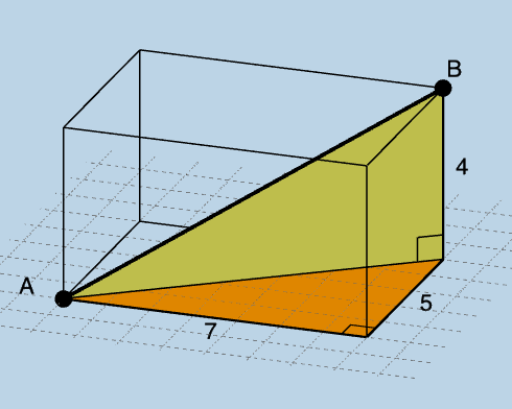
This example demonstrates constructing distances in 3D space, involving core math concepts such as coordinate geometry and solid geometry. Using GeoGebra commands like Segment, Angle, Polygon, etc., a prism can be constructed and edge lengths calculated. Suitable for high school math education, particularly for coordinate geometry and solid geometry.
GeoGebra Commands & Parameters
Segment(A, B) → fSegment(A, C) → gSegment(C, D) → hSegment(D, B) → iSegment(D, A) → jAngle(D, C, A) → αAngle(B, D, A) → βPolygon(A, C, D, E) → q1, a, c, d, ePrism(D, C, A, E, B) → b, F, edgeCD, edgeAC, edgeAE, edgeDE, edgeBD, edgeCF, edgeAG, edgeEH, edgeBF, edgeFG, G, edgeGH, edgeBH, H, faceACDE, faceBDCF, faceACFG, faceAEHG, faceBDEH, faceBFGHPolygon(D, C, A) → t1, a_1, d_1, c_1Polygon(D, B, A) → t2, l, m, nLength(l1) → oMode(l1) → l2RandomElement(l1) → pCountIf(x ≟ p, l1) → qIf(q ≟ 1, "1 unique", q ≟ 2, "2 unique", q ≟ 3, "3 unique") → text3If(q ≟ 1, "possibility exists.", "possibilities exist.") → text4
AI Drawing Prompt Reference
Draw a prism in 3D space with a quadrilateral base and rectangular sides. Start by sketching the four edges of the base, then connect corresponding points of the base and top to form the sides. Label the angles of the base and sides, and calculate the lengths of all edges. Finally, differentiate the faces with different colors and display the lengths and angles of key edges.
The prompt above was compiled from the original drawing commands and is for reference only.