
Counting Squares on a Chessboard
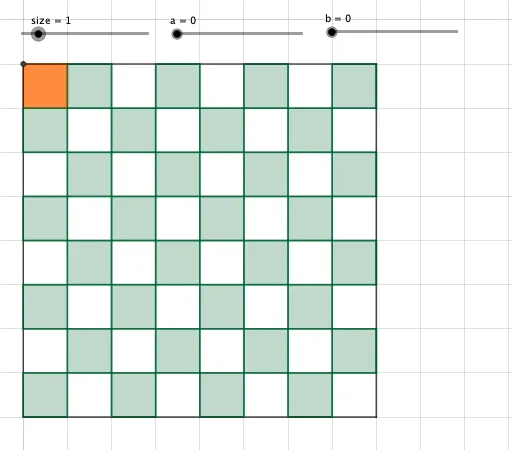
Loading the math board and drawing, please wait…
This example demonstrates how to systematically count squares on a chessboard, involving combinatorial mathematics and area calculations. It uses GeoGebra commands like Point, Max, Polygon, and Segment for construction. Suitable for middle school and above, ideal for teaching demonstrations or mathematical thinking exercises.
GeoGebra Commands & Parameters
Point(xAxis) → CPoint(yAxis) → EMax(a, b) → largestPolygon(B, A, 4) → poly1, f, g, h, i, F, GPoint(xAxis) → HSegment(H, E) → jSegment(H, C) → kSegment(C, D) → lSegment(D, E) → mPoint(k) → IPoint(k) → JPoint(j) → KPolygon(L, K, 4) → poly2, n, p, q, r, M, NPolygon(J, I, 4) → poly3, s, t, d, e, O, PPoint(k) → QPoint(k) → RPoint(k) → TPoint(k) → UPolygon(Q, R, 4) → poly4, f_1, g_1, h_1, i_1, V, WPolygon(V, P, 4) → poly5, j_1, k_1, l_1, m_1, Z, A_1Polygon(S, T, 4) → poly6, n_1, p_1, q_1, r_1, B_1, C_1Polygon(C, U, 4) → poly7, s_1, t_1, a_1, b_1, D_1, E_1Polygon(D_1, C_1, 4) → poly8, c_1, d_1, e_1, f_2, F_1, G_1Polygon(B_1, W, 4) → poly9, g_2, h_2, i_2, j_2, H_1, I_1Polygon(Z, N, 4) → poly10, k_2, l_2, m_2, n_2, J_1, K_1Polygon(H_1, A_1, 4) → poly11, p_2, q_2, r_2, s_2, L_1, M_1Polygon(F_1, I_1, 4) → poly12, t_2, a_2, b_2, c_2, N_1, O_1Point(l) → P_1Polygon(P_1, G_1, 4) → poly13, d_2, e_2, f_3, g_3, Q_1, R_1Point(j) → S_1Polygon(J_1, S_1, 4) → poly14, h_3, i_3, j_3, k_3, T_1, U_1Polygon(L_1, K_1, 4) → poly15, l_3, m_3, n_3, p_3, V_1, W_1Polygon(N_1, M_1, 4) → poly16, q_3, r_3, s_3, t_3, Z_1, A_2Polygon(Q_1, O_1, 4) → poly17, a_3, b_3, c_3, d_3, B_2, C_2Point(l) → D_2Polygon(V_1, U_1, 4) → poly18, e_3, f_4, g_4, h_4, E_2, F_2Polygon(Z_1, W_1, 4) → poly19, i_4, j_4, k_4, l_4, G_2, H_2Polygon(B_2, A_2, 4) → poly20, m_4, n_4, p_4, q_4, I_2, J_2Polygon(D_2, C_2, 4) → poly21, r_4, s_4, t_4, a_4, K_2, L_2Polygon(K_2, J_2, 4) → poly22, b_4, c_4, d_4, e_4, M_2, N_2Polygon(I_2, H_2, 4) → poly23, f_5, g_5, h_5, i_5, O_2, P_2Polygon(G_2, F_2, 4) → poly24, j_5, k_5, l_5, m_5, Q_2, R_2Point(j) → S_2Polygon(E_2, S_2, 4) → poly25, n_5, p_5, q_5, r_5, T_2, U_2Point(l) → V_2Polygon(V_2, N_2, 4) → poly26, s_5, t_5, a_5, b_5, W_2, Z_2Polygon(M_2, P_2, 4) → poly27, c_5, d_5, e_5, f_6, A_3, B_3Polygon(O_2, R_2, 4) → poly28, g_6, h_6, i_6, j_6, C_3, D_3Polygon(Q_2, U_2, 4) → poly29, k_6, l_6, m_6, n_6, E_3, F_3Point(j) → G_3Polygon(W_2, B_3, 4) → poly30, p_6, q_6, r_6, s_6, H_3, I_3Polygon(A_3, D_3, 4) → poly31, t_6, a_6, b_6, c_6, J_3, K_3Polygon(C_3, F_3, 4) → poly32, d_6, e_6, f_7, g_7, L_3, M_3Polygon(E_3, G_3, 4) → poly33, h_7, i_7, j_7, k_7, N_3, O_3