
Cosine Rule Question Generator for Side Length
Loading the math board and drawing, please wait…
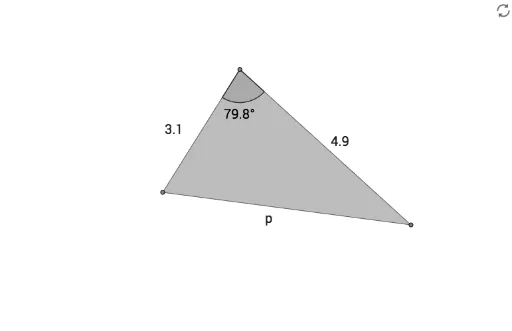
① This dynamic GeoGebra example serves as a random question generator for finding a missing side length using the cosine rule. It presents a triangle with two known sides and the included angle, asking the learner to compute the third side. ② The core mathematical concept is the cosine rule (c² = a² + b² - 2ab·cosC), which connects triangle side lengths and angles, involving trigonometry and algebraic manipulation. ③ Construction details: The triangle is built using GeoGebra commands such as Point, Segment, Polygon, and Angle, with objects including vertices A, B, C, sides a, b, c, angle α, and auxiliary elements like t1 and p. Randomization is achieved through stochastic processes or sliders, generating varied side-length combinations for each new question. ④ This tool is suitable for middle or high school mathematics classes, enabling teachers to create numerous practice problems and students to reinforce their understanding of the cosine rule in a self-paced manner.
GeoGebra Commands & Parameters
Point(Circle[A, sameside]) → BSegment(A, B) → fPolygon(A, C, B) → t1, b_1, a_1, pAngle(A, C, B) → α
AI Drawing Prompt Reference
Draw a triangle where two side lengths and the included angle are known, and the third side length needs to be calculated. Start by drawing a circle centered at one point with a known length as the radius. Mark a point on the circle, connect this point to the center to form one side, and then connect the two endpoints of the first side to complete the triangle. Label the known side lengths and the included angle, and indicate the third side length as the unknown value.
The prompt above was compiled from the original drawing commands and is for reference only.