
Cosine Rule - Find an Angle
Loading the math board and drawing, please wait…
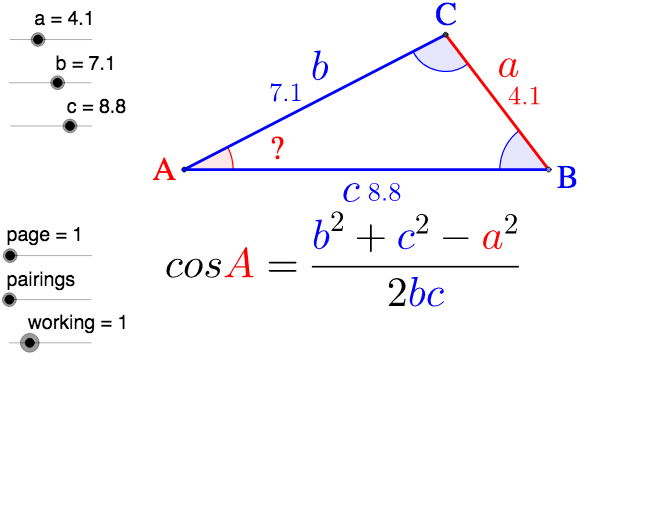
This example demonstrates how to use the Cosine Rule to find an angle in a triangle. It involves core math concepts like the Cosine Rule. Construction uses GeoGebra commands/objects: Point, Circle, Intersect, Angle, Segment, Midpoint, If, Vector. Suitable for high school mathematics teaching and understanding practical applications of the Cosine Rule.
GeoGebra Commands & Parameters
Point(Circle[R, c]) → QCircle(Q, a) → d_1Circle(R, b) → c_1Intersect(c_1, d_1) → P, B_1, ,Angle(P, Q, R) → δAngle(Q, R, P) → α_1Segment(P, R) → b_2Segment(R, Q) → c_2Segment(Q, P) → a_2Midpoint(a_2) → A'Midpoint(c_2) → C'Midpoint(b_2) → B'Midpoint(C', A') → DMidpoint(C', Q) → EMidpoint(A', Q) → FMidpoint(F, E) → GMidpoint(R, B') → HMidpoint(C', R) → IMidpoint(I, H) → JMidpoint(B', P) → KMidpoint(A', P) → LMidpoint(B', A') → MMidpoint(K, L) → NMidpoint(N, M) → OIf(CosA < 0, "-", "") → signCosAIf(CosB < 0, "-", "") → signCosBSegment(R, Q) → a_1Segment(R, P) → b_1Segment(P, Q) → e_1Angle(R, P, Q) → εVector(R, A') → uVector(P, C') → wVector(Q, B') → v
AI Drawing Prompt Reference
Draw a triangle with labeled sides and calculate an angle using the cosine rule. Start by drawing two intersecting circles to form the triangle. Mark the midpoints of each side and connect them. Represent the direction from vertices to midpoints with vectors. Finally, calculate and label the angle using the cosine rule, noting the sign.
The prompt above was compiled from the original drawing commands and is for reference only.