
Cosine Function Geometric Tracer
Loading the math board and drawing, please wait…
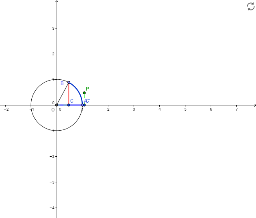
This GeoGebra applet dynamically demonstrates the generation of the cosine function's trace by geometrically relating arc lengths on a circle to the side lengths of a constructed triangle. The core mathematical concepts involved include the geometric definition of the cosine function, the properties of the unit circle, the relationship between angular displacement and linear projection, and fundamental trigonometric ratios in right-angled triangles. In terms of construction, the applet utilizes key GeoGebra commands such as Intersect, Point, Circle, Segment, and CircleArc to define a network of geometric objects, including points O, A, c, B, a, b, d, C', e, C, g, P, f, and h. The dynamic linkage among these elements traces the cosine wave as the input parameter varies. This resource is highly suitable for high school trigonometry and precalculus courses, university-level introductory calculus, and interactive geometry labs aimed at helping students visualize the geometric origins of trigonometric functions.
GeoGebra Commands & Parameters
Intersect(xAxis, yAxis) → OPoint(xAxis) → ACircle(O, A) → cPoint(c) → BSegment(A, O) → aSegment(O, B) → bCircleArc(O, A, B) → dSegment(O, C') → eSegment(B, C) → gSegment(O, C) → fSegment(C', P) → h
AI Drawing Prompt Reference
Draw a unit circle centered at the origin with a point on the positive x-axis as the starting point. Place a moving point on the circle that travels along the arc from the starting point. Connect the center to the moving point to form a radius, and drop a perpendicular from the starting point to this radius, marking the foot. Construct a right triangle where one leg is the horizontal projection of the radius and the other leg is the perpendicular segment. As the moving point travels around the circle, trace the length of the projection against the angle to generate the cosine wave. Include the circle, radius, perpendicular, right triangle, and the resulting cosine curve.
The prompt above was compiled from the original drawing commands and is for reference only.