
Cardioid
Loading the math board and drawing, please wait…
In collections
Curves and Surfaces
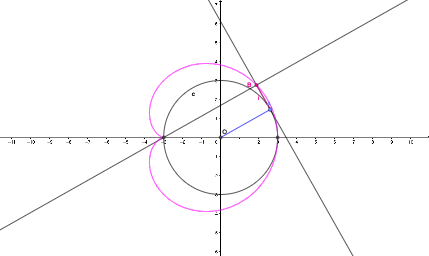
This example demonstrates the generation of a cardioid, a special type of curve that belongs to the family of rose curves. By constructing a circle and its tangent lines, a cardioid can be generated. The example uses commands such as Intersect, Circle, Point, Tangent, OrthogonalLine, Locus, and Segment in GeoGebra. Suitable for high school mathematics education and learning.
GeoGebra Commands & Parameters
Intersect(xAxis, yAxis) → OCircle(O, r) → cIntersect(c, xAxis, 1) → A_{1}Intersect(c, xAxis, 2) → B_{1}Point(c) → ATangent(A, c) → f,OrthogonalLine(A_{1}, f) → gIntersect(f, g) → BLocus(B, A) → loc1Segment(A, O) → hSegment(B, A) → i
AI Drawing Prompt Reference
Draw a cardioid by first creating a circle, then finding its intersections with the x-axis. From the center of the circle, draw a tangent to the circle at a point on the circle. Next, draw a perpendicular line from one of the x-axis intersections to the tangent line, and find their intersection point. The locus of this intersection point as it moves along the circle creates the cardioid. Finally, connect the center of the circle to the intersection points and the intersection points to the locus points to complete the shape.
The prompt above was compiled from the original drawing commands and is for reference only.